


BlackVue DR590X Full HD Dash Cam In-Depth Review
Our verdict on the original DR590X: video, parking power and everyday use
Our take: compact 1080P FHD coverage, with a clear parking-power plan
The original BlackVue DR590X-2CH makes sense for a driver who wants front and rear recording in a small, screenless camera. We like this approach when keeping the windshield uncluttered matters more than having a display on the camera.
Its strongest practical combination is 1080P FHD recording on both channels, local Wi-Fi and parking recording with built-in voltage control. The tradeoff is detail: it is a 1080P FHD camera, so choose a higher-resolution model if extra image detail is your priority. No resolution guarantees a readable plate in every situation.
This review covers the original DR590X generation. The DR590X Plus is a separate model; its current specifications and package should not be applied to an older DR590X.
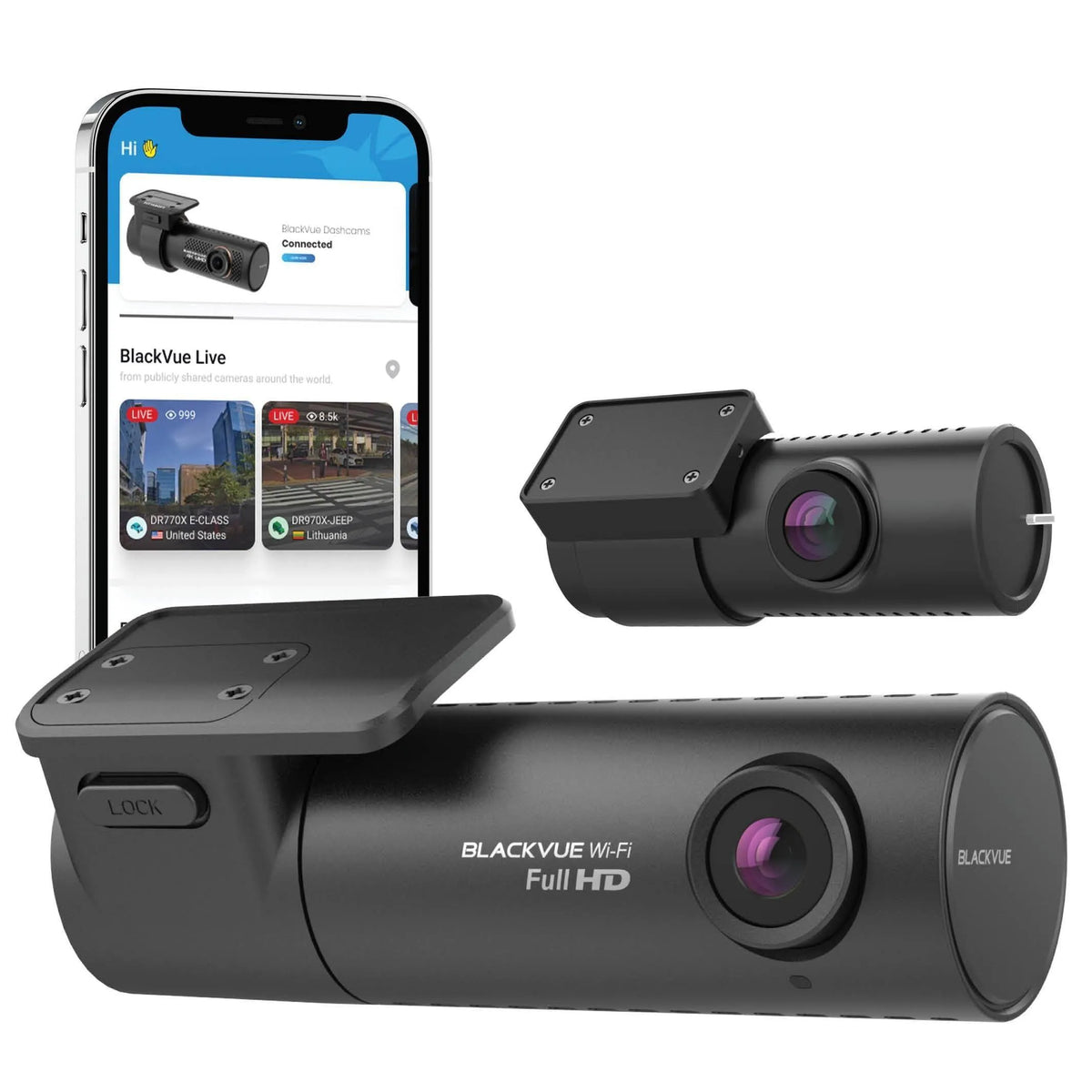
DR590X camera gallery
These camera views show the body, mounting points and controls. The app artwork includes demonstrations from other BlackVue cameras; use the exact DR590X features and connection guidance in this review.


Watch the original sample footage
Installation and everyday recording
Position the front camera behind the rear-view mirror where it has a clear view without obstructing yours. Mount the rear camera on the rear glass and connect it to the front unit with the specified rear-camera cable. Route both cables securely, clear of airbags, controls and moving trim.
With the cigarette-lighter power cable connected to an ignition-switched socket, the camera starts when power is supplied and records to its microSD card. Socket behaviour varies by vehicle. An always-powered socket needs a suitable power-management plan; leaving the camera plugged in does not by itself provide the hardwired ignition signal or battery protection.
The original DR590X-2CH manual lists 32, 64, 128 and 256 GB microSD cards. Loop recording replaces older recordings, so copy important clips promptly. Power the camera off before removing its card.
The original manual lists the front and rear cameras, rear cable, plug-in power cable, card, adapter and mounting items; it marks the hardwiring cable and external GPS optional. We do not assume every current or refurbished package contains the same accessories.

Video quality: 30 FPS on both channels
The DR590X-2CH records 1080P FHD at 30 FPS front and rear. Its front camera uses an approximately 2.1 MP Sony STARVIS sensor; the rear has an approximately 2 MP CMOS sensor. The original manual lists a 139° diagonal front view and a 136.8° rear view.
The DR590X-1CH is the front-only 60 FPS version. Disconnecting the rear camera does not turn the 2CH model into that camera: the original 2CH manual fixes its recording resolution and frame rate. More frames can make motion look smoother, but frame rate alone does not establish low-light detail or eliminate blur.
The DR750X-2CH was the higher-tier model discussed in our original review. For a purchase today, ask us to compare available models around the resolution, rear coverage and parking features you need.

Parking recording needs suitable power
For parked coverage, we recommend planning the power connection first. The parking mode records detected movement and impact rather than promising continuous protection from every event. The original manual documents buffered motion recording, which keeps footage from before the trigger.
With Parking mode recording enabled, a suitable BlackVue three-wire hardwiring cable lets the ignition signal switch the camera into parking mode when the vehicle is turned off. The manual also describes entry after five stationary minutes using the G-sensor. That detection method still needs suitable power for recording after the engine stops.
The camera has a configurable low-voltage cutoff and parking timer. These help limit vehicle-battery discharge; they do not guarantee an overnight runtime or that every vehicle will start. Battery condition, temperature, settings and driving time affect what is practical.
A dedicated parking battery can power the camera without drawing from the starter battery while parked. The Power Magic Ultra Battery B-124X is the accessory discussed in the original review. We can help you match the camera, power cable and an available battery without promising a fixed runtime.
Use Wi-Fi nearby, or a card reader for longer reviews
There is no screen on the DR590X. Connect your phone directly to its built-in Wi-Fi to use the BlackVue app for nearby Live View, settings and recordings. We recommend Live View when aiming the camera, then checking an actual saved clip before finishing the installation.
For a longer review, use BlackVue Viewer on a Windows PC or Mac with the microSD card in a reader. It lets you review front and rear recordings and sort files by time and recording type. Maps, recorded speed and location need the optional external GPS receiver; they are not built into every DR590X system. Use BlackVue’s current downloads for your device rather than relying on the operating-system minimums printed in the 2020 manual.

Recording safeguards still need a backup
We recommend copying any important incident to a phone or computer as soon as it is safe. Keeping a protected file on the card is useful, but it is not a separate backup.
- Event locking: the original manual documents up to 50 locked event files and an option to overwrite the oldest locked files with new events when that space is full.
- Formatting: formatting deletes locked files too. Back up first, including before saving time or image-quality changes that format the card.
- Scheduled reboot: the camera can reboot once daily in parking mode at the selected time. It skips the reboot if recording at that time.
- Card maintenance: adaptive format-free management is documented for this model. It does not make a microSD card permanent or remove the need to investigate recording faults.
If the camera reports a card problem, first preserve readable recordings and then troubleshoot the card. BlackVue’s card troubleshooting guidance explains why formatting cannot repair failed card hardware.

Upgrading from a DR590S: check the hardware before keeping wiring
The DR590X adds built-in parking-power controls compared with the older installation described in our DR590S review. A Power Magic Pro is not required to provide the DR590X’s own low-voltage cutoff when using its correct three-wire hardwiring setup.
We recommend checking the exact rear camera and both cables before replacing only the front unit. Our original article said the DR590S rear camera and rear connecting cable could be kept, but the exact original DR590X manual does not establish that cross-generation compatibility. Send us the camera labels and cable details so we can help confirm the right parts before you disturb an existing installation.
Do not buy the original DR590X for a promised current hotspot or always-connected service. Its 2020 manual did describe optional Cloud Lite through a CM100GLTE-M module, an activated LTE-M SIM and country-dependent availability. That historical feature is not proof of current US or Canadian module, carrier or service support, and it is not an interchangeable CM100LTE recommendation.
For a DR590X you already own, our recommendation is to focus on healthy storage, a clear camera view and correctly configured parking power. If remote access is essential to your next purchase, let us match you with a currently supported connected system.
A BlackVue installation example

Questions we would answer before choosing the DR590X
Can I use parking mode without hardwiring?
A compatible dedicated parking battery is an alternative described in the original manual. A socket that turns off with the engine cannot keep the camera recording after power is lost. We can help you choose the correct power setup.
Does Wi-Fi mean I can watch the camera from anywhere?
Local Wi-Fi connects your nearby phone directly to the camera. It does not provide internet access by itself. The historical Cloud Lite option had separate module, SIM and service conditions; confirm present support before buying for remote access.
Will removing the rear camera unlock 60 FPS?
No. The original DR590X-2CH has fixed 1080P FHD at 30 FPS on both channels. The DR590X-1CH is the separate front-only 60 FPS model.
How do I keep an incident recording?
Download or copy the original files to separate storage, including the clips around the event, and confirm they play. Event locking on the card does not protect a recording from formatting or card failure.
Let us help you choose the right setup
Tell us whether you need front-only or front-and-rear coverage, how long you park and whether remote access matters. We’ll help you choose the camera, power and installation parts that fit your vehicle.
Ask our dash cam expertsTechnical reference: BlackVue’s original DR590X-2CH manual. For specific controls, see our DR590X settings guide.