Skip to content
SKU EW-P5

BlackboxMyCar PowerCell 5 LiFePO4 USB-C Dash Cam Battery Pack

Availability:
in stock, ready to be shipped
Save 33% Save 33%
Original price $299.99
Original price $299.99 - Original price $299.99
Original price $299.99
Current price $199.99
$199.99 - $199.99
Current price $199.99
Best Price Guaranteed
Every order includes:

Chat with an expert

Talk to a dash cam expert before you order.

BlackboxMyCar PowerCell 5 LiFePO4 USB-C Dash Cam Battery Pack

The PowerCell 5 stores 51.2Wh of energy for a dash cam to use while the vehicle is parked. It recharges during driving and has an LCD, a configurable shutdown timer and USB ports for charging compatible devices.

At 87 × 160 × 38mm and 0.75kg, it suits installations where space matters. Choose it for onboard controls and USB-C; choose the PowerCell 8 for more capacity, Bluetooth monitoring and supported battery expansion.

51.2Wh

Shutdown Timer

45W USB-C

LCD Controls

Parking runtime depends on the camera

The 4,000mAh LiFePO4 battery is rated at 12.8V, giving a nominal capacity of 51.2Wh. BlackboxMyCar quotes about 30 hours at a 1.7W camera load or 16 hours at 3.2W. These are reference loads, not a promise for every one-channel or two-channel camera.

Extra cameras, Cloud connections and devices drawing USB power reduce the time available. Start with a full battery and measure your own parking-mode setup. The camera determines which recording modes are available; the battery supplies power.

PowerCell 5 battery with the included unspliced and socket output harnesses

Set the timer on the built-in LCD

The LCD and buttons let you check battery status and change settings without a phone. Set the shutdown timer from 1 to 24 hours to stop the dash cam output after a chosen period. A display of "--" disables the timer.

The timer controls the dash cam input/output connector only. It does not switch off the USB ports or the entire battery. For compatible parking operation, check the ACC setting as well as the dash cam settings; the manual explains the up, down and OK button controls.

There is no Bluetooth app. Keep the display and buttons accessible when choosing a mounting position.

PowerCell 5 LCD and onboard control buttons

Charge from a switched 12V supply

Allow approximately 33 minutes at the 8A hardwire setting or 65 minutes at the 4A cigarette-socket setting for a full charge. Temperature, starting charge and the vehicle supply affect charging time. Short drives may replace only part of the energy used while parked.

The battery defaults to low-speed charging. Use high-speed charging only with a correctly installed hardwire input. The supplied manual explains the button combination for changing charging speed.

Use a socket that switches off with the vehicle, or a suitable ignition-switched fuse circuit. An always-live socket can keep drawing from the starter battery after parking. Follow our hardwiring guide and verify the circuit with a circuit tester.

PowerCell 5 installation diagram showing battery charging and camera power as separate connections

USB charging and an emergency light

The front panel has two USB-A ports, with a specified maximum USB output of 20W, and a USB-C input/output port rated up to 45W. Supported power depends on the connected device, cable and charging protocol; these ratings are not a promise of simultaneous maximum output from every port.

USB-C can charge a compatible phone, tablet or laptop that accepts its available power. Using the USB ports shares the battery reserve with the dash cam. The rear LED light provides local illumination when needed.

Use the appropriate camera harness for ACC-based parking operation. A USB charging connection alone does not provide every camera with the required parking signal.

PowerCell 5 with two USB-A ports and one USB-C input/output port

Choose the mounting location and cable together

The included socket output harness accepts a compatible camera power adapter. The unspliced output harness is for connection to the camera’s appropriate hardwire kit. For example, a VIOFO model using an HK4 USB-C hardwire kit still needs that regulated camera connection; never feed the battery’s 12V output directly into a 5V camera.

Check the output cable guide against your exact model. A brand name or matching connector shape is not enough to confirm parking compatibility. Camera-specific hardwire kits are separate unless explicitly included in your order.

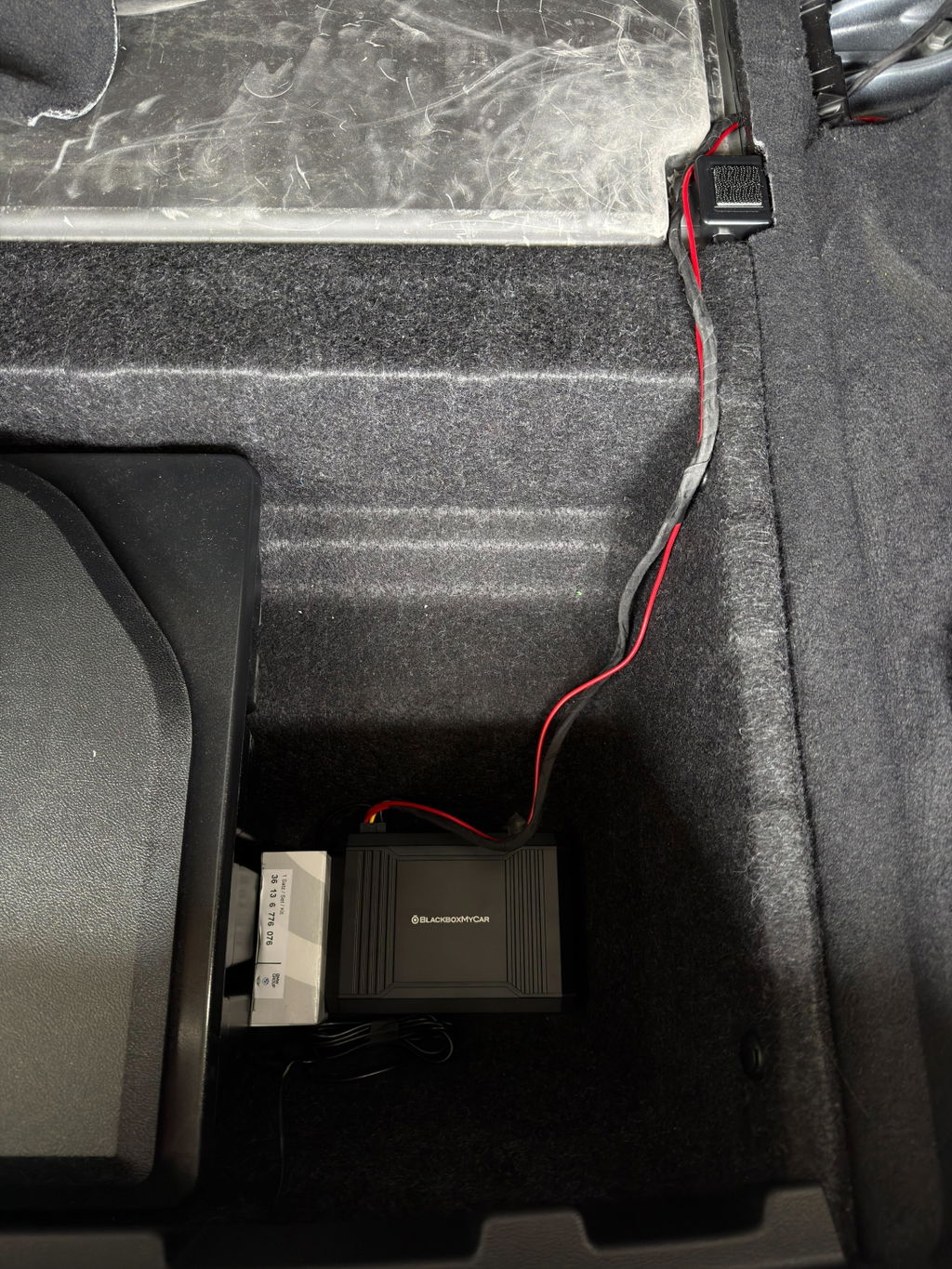
Secure the pack in a dry, shaded cabin location, clear of seat rails, airbags and moving parts. Leave room for the connectors and controls. Operating range is −10°C to 60°C (14°F to 140°F); charge only from 0°C to 45°C (32°F to 113°F).

PowerCell 5 dimensions and examples of mounting space inside a vehicle
What's Included
  • PowerCell 5 battery pack
  • Unspliced output cable with integrated hardwire input
  • Socket output cable with integrated hardwire input
  • 12V cigarette-socket input cable
  • Three crimp sleeves
  • One each of ATO, low-profile Mini, Micro 2 and Mini Add-a-Fuse adapters, with supplied 20A fuses
  • Two Velcro strips
  • User manual
Specifications
Battery Chemistry LiFePO4
Capacity 12.8V / 4,000mAh / 51.2Wh
Charging Input 12V accessory system; 11.5V to 15V, 8A maximum
Camera Output 12V to 14.2V, 3A maximum
Operating Temperature −10°C to 60°C (14°F to 140°F)
Dimensions 87 × 160 × 38mm
Weight 0.75kg
Warranty 1 year
Model / SKU PowerCell 5 / EW-P5
Charge time: hardwire Approximately 33 minutes at 8A
Charge time: socket Approximately 65 minutes at 4A
USB-A Two ports; specified USB output up to 20W
USB-C One input/output port; up to 45W
Display and controls 1.65-inch LCD and onboard buttons
Shutdown timer 1 to 24 hours; dash cam connector only
Emergency light Built-in rear LED
Bluetooth / expansion No Bluetooth; no supported expansion battery
Charging temperature 0°C to 45°C (32°F to 113°F)
Frequently Asked Questions

How long can the PowerCell 5 run my dash cam?

The reference figures are about 30 hours at a 1.7W load and 16 hours at 3.2W. Your camera settings, recording mode, battery charge and USB use change the result. Higher-power or multi-camera systems can run for much less time.

What does the shutdown timer turn off?

It stops power from the dash cam input/output connector after the selected 1 to 24 hours. It does not control the USB ports or switch off the battery itself. Set "--" to disable the timer.

Why is my camera staying in normal recording mode?

Check the camera’s parking settings, the output wiring and the PowerCell 5 ACC setting. The manual describes how ACC ON and ACC OFF affect a compatible camera. A constant USB supply or socket adapter may not provide the required ACC signal.

How do I choose low or high charging speed?

Low speed is the default and is used with the 12V socket cable. High speed is for a suitable hardwired charging circuit. Follow the manual’s OK/up and OK/down button instructions and confirm H or L on the display.

Can I use an always-live cigarette socket?

It can continue charging the pack from the starter battery while parked. Use an ignition-switched socket or a correctly wired ACC circuit for the intended charge-while-driving setup.

Does the PowerCell 5 have Bluetooth?

No. Use the LCD and onboard buttons. The PowerCell 8 adds Bluetooth monitoring through the Cellink NEO Plus app.

Can I connect an expansion battery?

No supported PowerCell 5 expansion battery is currently available. A labelled EXT.BAT port in the manual is not confirmation of compatibility with another battery. For supported expansion, choose a PowerCell 8 with its compatible Cellink NEO Extended pack.

Can I connect it directly to 24V?

No. Its vehicle input is intended for a 12V accessory system, within the specified 11.5V to 15V range. Do not connect it directly to a 24V circuit.

Can the USB-C port charge a laptop?

It can supply up to 45W to a compatible device and cable. Some laptops need more power or may charge slowly. USB use reduces the reserve available for parking recording.

Are the camera and its hardwire kit included?

No dash cam is included. The package contains the battery’s input and output harnesses; a camera-specific regulated hardwire kit may still be needed. Check the exact camera and harness combination before ordering.

How much space does it need?

The pack measures 87 × 160 × 38mm and weighs 0.75kg. Allow extra room for plugs, cable bends, the display and moving seat parts. Secure it inside the cabin.

Can I charge it below freezing?

The specified charging range starts at 0°C (32°F). Its wider operating range does not permit charging below that limit. Keep it dry and away from direct sun or other heat sources.

Should I choose PowerCell 5 or PowerCell 8?

PowerCell 5 offers 51.2Wh, onboard LCD controls and USB-C in a smaller package. PowerCell 8 offers 96Wh, Bluetooth monitoring and supported expansion. Choose by the camera’s power draw, parking duration and available installation space.

What warranty is included?

The PowerCell 5 has a one-year manufacturer warranty. Follow the installation and operating instructions; damage from incorrect use or modification is not normal warranty coverage.

Resources
  • 5 stars: 11 (65%)
  • 4 stars: 5 (29%)
  • 3 stars: 1 (6%)
  • 2 stars: 0 (0%)
  • 1 star: 0 (0%)
D
David L. (Canada)
Great battery with a small footprint.

I bought this battery pack to give the parking mode in my A229 Ultra an extended recording time. While i personally haven't timed it, it works just make sure you set ACC to the off position so when you turn off the car, it'll know to trigger the parking mode. That said, I installed this in my BMW i4, and tapped into my ACC+ fuse. While the included fuses at 20a, I swapped it out for a 10a fuse. Since the amperage during the fast charge maxes out at 8a. If it overdraws, I'd rather have the 10a fuse blow before it does any harm to the electricals in my car.

The form factor is awesome, I can neatly stow it away in one of the compartments and it'll never know it's there, The USB ports are a nice touch although I figure i'll never use it, maybe in a pinch? Anyways, this battery it priced well, and I love the metal body. IT doesn't get too hot. I'll definitely use this for future installs or recommendations.

Thanks for the detailed review, David! We’re glad to hear the PowerCell 5 has been a great fit for your A229 Ultra and that the compact form factor worked well in your BMW i4. It’s great to know you’re happy with the build quality, temperature performance, and added parking mode runtime. We really appreciate the recommendation for future installs.

A
Anonymous (Canada)
Wouldn't recommend while using LTE addon

This battery pack is no good for the Thinkware u3000 pro. Battery doesn't even last 10hrs in parking mode with motion detection. Forget about using it with a LTEaddon. Lucky to get 8HRS. And because it can't be expanded your stuck with short lasting battery.

Wouldn't recommend if you plan on using LTE ADD-ON

Thanks for the honest feedback. The PowerCell 5 is our smaller-capacity option, so your experience is fair, especially with an LTE module adding extra power draw. For setups like the U3000 Pro with LTE, we generally recommend at least a PowerCell 8, ideally with an expansion pack if longer parking mode runtime is the priority.

A
Anonymous (Canada)
Great product for money worth long battery

Great product for money worth long battery charge

Thanks for the review! We’re glad to hear the PowerCell 5 has been a great value for you and that you’re happy with the battery life.

O
Orestes B. (United States)
👍

He comprado una superbateria,adecuada a lo que deseaba y necesitaba;todo sta perfectamente elaborado;efectividad,apariencia,tamaño,en general soy una persona altamente perfeccionista y esta beteria powercell 5 ;sirvio!!!estamos en proceso de prueba pero todo marcha al 200%

¡Gracias por tu reseña, Orestes! Nos alegra saber que la PowerCell 5 cumple con lo que buscabas y necesitabas. Es excelente escuchar que estás satisfecho con su rendimiento, apariencia y tamaño. Esperamos que siga funcionando al 200% para tu configuración.

C
Customer (Canada)
So far a great product gives me peace of mind

So far a great product gives me peace of mind. I think the timer function is its best feature for me. I make short trips for shopping mostly and the rest of the time my car is parked in the garage. The timer function allows the camera to stay on for a set amount of time only so it doesn’t drain the battery fully, sitting in the garage. Note the USB inputs in the front of the unit are not controlled by the timer function. You need to access the rear plug for this feature.

Thanks for your review, Christine! We’re glad to hear the PowerCell 5 is giving you peace of mind and that the timer function has been especially useful for your driving habits. We appreciate you pointing out the USB port behaviour as well.

J
J (Canada)
Repeat customer.

I have bought multiple different dash cams and battery packs from this website over the years. For multiple different vehicles. Pricing is competitive, shipping is quick, products are whatever quality you choose and customer service is great. I tend to buy the more expensive higher quality products because my truck isn't cheap. I want the best of the best to protect my investment. They have the options that best suit you, make a choice.

Thanks for the review! We really appreciate your continued support over the years and are glad to hear you’ve had great experiences with our products, pricing, and service. It means a lot that you trust us to help protect your vehicles.

D
Dexter D. (Canada)
Solid Performance So Far

On my 3rd day using the PowerCell 5 with my BlackVue DR590X-2CH, and so far, it’s been great. The cold weather here in Manitoba does make things more challenging, but the battery is holding up well. I’m getting over 10 hours of parking mode recording, and since it only records when motion is detected, it helps conserve power instead of running continuously. Overall, a solid investment for protecting your vehicle without draining your car battery.

Thanks for the detailed review, Dexter! We’re glad to hear the PowerCell 5 is performing well for you, especially in colder Manitoba conditions. It’s great to know you’re getting solid parking mode coverage without putting strain on your vehicle’s battery.

A
Anonymous (United States)
Things to note

The item works, somewhat. I am using both USB and USB-C ports, plugging in 3 different cameras. Depending on your power consumption needs for each camera, it might not balance the power needs correctly. In my case, the USB-C plug-in for one of my cameras draws more power, which ultimately turns off my other two in the long run. I might have to choose between using the USB or USB-C ports only.

Thanks for taking the time to share your experience. The PowerCell 5 is designed primarily to support a single dash cam system, and with its 4,000 mAh capacity, running multiple cameras can lead to significantly shorter-than-advertised runtimes. Your observation about power draw differences between ports is helpful and accurate, and we appreciate you pointing that out for others who may be considering a similar setup.

O
Oliver P.
A bit large

Works well and does the job. It's a bit bigger than I expected but I like the screen tho

Thanks for your review, Oliver! We’re glad to hear the PowerCell 5 is working well for you and that you’re enjoying the built-in screen. If you ever have questions about placement options or setup, feel free to reach out.

N
Nina S.
Feels safe and solid

battery chemistry is a big plus I feel way safer using it in hot weather

Thanks for your review, Nina! We’re glad to hear the PowerCell 5 gives you confidence, especially in hot weather. Safety and reliability are exactly what it’s designed for.

E
Ethan G.
Easy to understand info

The voltage and time-left readouts are really helpful for quick checks

Thanks for your review, Ethan! We’re glad to hear the PowerCell 5’s display makes it easy to keep track of voltage and remaining time. If there’s anything we could have done to make your experience a full five stars, feel free to let us know.

M
Mark T.
Works flawlessly

Setup was quick and simple and it has been reliable every day since

L
Laura B.
Perfect for long parking

Keeps my dual-cam setup running even during long overnight parking

S
Sophie L.
Love the USB-C port

Nice having a USB-C port for charging my phone while the dash cam runs

E
Emily R.
Handy LCD display

The screen makes it super easy to check charge level before parking Really convenient

Z
Zara M.
Reliable for road trips

Takes care of my dash cam for hours during long stops and overnight hotel parking

R
Ryan H.
Great battery life

Lasts ages in parking mode and keeps my dash cam running all night without touching the car battery

J
JR

Hi, my dash cam requires a cigarette plug to work, not USB. Does the battery have the terminals for a 12v out socket?

BlackboxMyCar

Yes it does. Every PowerCell 5 includes one

G
George

How would i connect this to a viofo a329 that is connected with a Dongar classic mirror tap

BlackboxMyCar

The Dongar mirror tap would need to be bypassed, as it does not provide the correct input for charging the PowerCell 5. The battery pack should be powered using its included 12V cable or hardwired to the fuse box, then connected to the VIOFO A329 using the VIOFO hardwire kit and the PowerCell 5’s unspliced output cable. This setup allows the battery pack to power the camera properly in parking mode without drawing from your vehicle’s battery.

o
oscar

where can i get a tutorial

BlackboxMyCar

We don't have a tutorial for the PowerCell 5, but you can find the user manual here: https://www.blackboxmycar.com/pages/manuals

o
oscar

where can i get a tutorial

BlackboxMyCar

We don't have a tutorial for the PowerCell 5, but you can find the user manual here: https://www.blackboxmycar.com/pages/manuals

Loading add-ons...