
Skip to content
SKU BV-OBDII

BlackVue OBD-II Power Cable

Availability:
in stock, ready to be shipped
Save 15% Save 15%
Original price $25.99
Original price $25.99 - Original price $25.99
Original price $25.99
Current price $21.99
$21.99 - $21.99
Current price $21.99
Best Price Guaranteed
Every order includes:

Chat with an expert

Talk to a dash cam expert before you order.

BlackVue BOC-300 OBD-II Power Cable

Enable driving and parking recording on a compatible BlackVue through the vehicle’s OBD-II port. The 3m BOC-300 connects to the camera’s DC input without fuse taps. The camera controls its low-voltage cutoff; installation still needs the vehicle compatibility check below.

OBD-II Connection

Parking Mode Power

3m Cable

BlackVue Fit

Vehicle Check

One cable from the OBD-II port to the camera

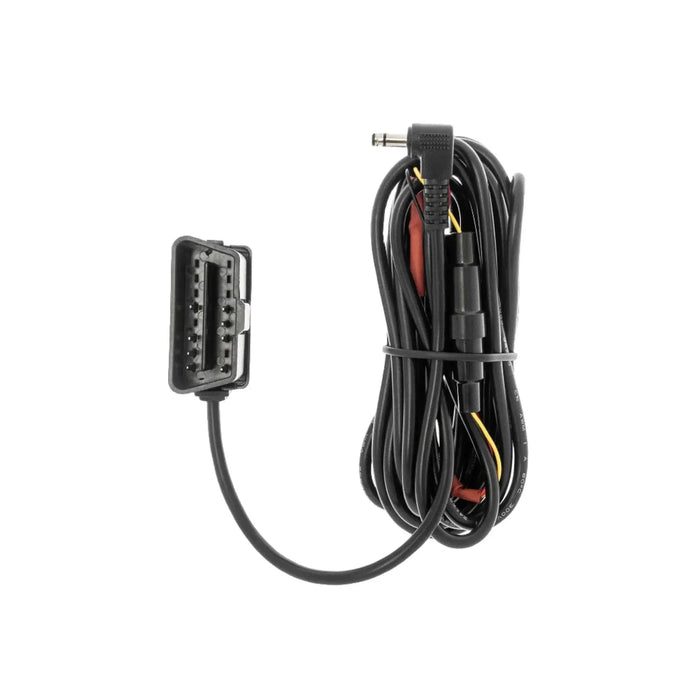
Route the cable from the vehicle’s diagnostic port to the camera without leaving it near pedals, controls or an airbag deployment path. BOC-300 uses BlackVue’s 3.5 × 1.1mm DC plug. It is not a USB supply, diagnostic scanner or adapter for other dash cam brands.

Supported cameras include the BlackVue Elite 8 2CH, DR770X 2CH Series II and DR970X LTE Plus II. BlackVue lists the ELITE Series, DR970X Series (including Plus, LTE and Box), DR770X Series (including LTE and Box), DR900X, DR750X and DR590X Series as compatible. Older S-series cameras, DR750-2CH LTE and DR750X-2CH LTE Plus do not use this connection.

On a supported vehicle, start the ignition and check that the BOC-300’s red LED stays on. Switch the ignition off and confirm the LED turns off. That change is the ignition-state check; with parking mode enabled, it does not mean the camera must immediately lose all power. Confirm the camera also changes recording mode as intended.

BlackVue BOC-300 OBD-II power cable with vehicle connector and camera DC plug

Set parking protection and check the vehicle exceptions

Select the available parking recording mode and battery-protection settings in the BlackVue app. The camera’s cutoff helps limit battery discharge. Parking duration varies with battery condition and recording settings. To power the camera while parked without drawing from the vehicle battery, use a compatible BlackVue B-130A Power Magic battery instead of the OBD cable. If the vehicle is unsuitable for OBD power, the BlackVue three-wire hardwire cable is an alternative for supported cameras.

BlackVue lists Hyundai Santa Fe 2019–2023, Hyundai Palisade 2019–2022, Mazda CX-5 2016 and Audi A6 2023 as incompatible. Non-standard OBD ports, including those on some Tesla models, are also excluded. Some Ford and Lincoln applications may be unsuitable; verify the exact vehicle before ordering.

BlackVue specifies support for most vehicles made since 2010, including vehicles with stop-and-start engines. Compatible gasoline, diesel, hybrid and electric vehicles can use BOC-300. That is not a promise for every vehicle of those types. When moving the cable to another vehicle, follow the BOC-300 reset instructions, then repeat the compatibility and recording-mode checks. BOC-400 instructions for a green LED describe a different cable.

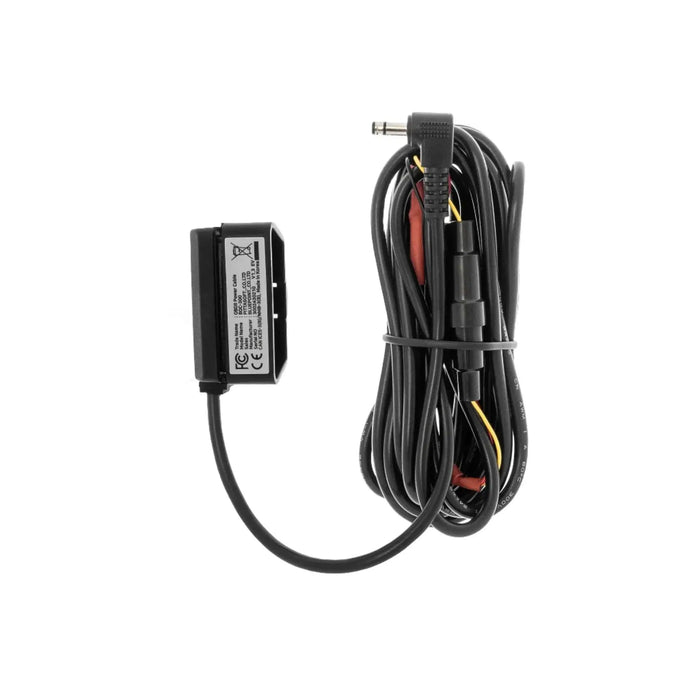
BlackVue BOC-300 cable and labelled OBD connector housing
What's Included
  • 1 BlackVue BOC-300 OBD-II power cable
Specifications
Connection (Battery/Source End) Standard OBD-II; vehicle compatibility must be verified
Connection (Camera/Device End) 3.5mm outer × 1.1mm inner diameter
Cable Length 3m / 9.84ft
Electrical Rating 3A at 12V; 36W
Warranty 2-year manufacturer warranty, honored by BlackboxMyCar
Model BOC-300
Cable weight 80g / 0.176lb
Battery protection Controlled by the compatible BlackVue camera
Frequently Asked Questions

Will BOC-300 work with every OBD-II vehicle?

Check the exact vehicle, not just the socket. BOC-300 supports many vehicles from 2010 onward, but port wiring and ignition detection matter. Some EVs and commercial vehicles use different diagnostic arrangements. Check the listed exceptions for your model and year, then complete the red-LED ignition test after installation.

Which vehicles are known exceptions?

BlackVue lists Santa Fe 2019–2023, Palisade 2019–2022, CX-5 2016 and A6 2023, plus non-standard ports such as some Tesla applications. Some Ford and Lincoln models also need verification. This is not an exhaustive list.

Can it support an EV, hybrid or stop-start engine?

Yes, on a compatible vehicle with the correct standard port and ignition behavior. Vehicle type alone is not a compatibility guarantee.

Does the cable have its own adjustable low-voltage controller?

The supported BlackVue camera manages the battery-protection settings. Set the cutoff in the camera’s app and verify parking operation; the cable is not a separate battery pack.

Why does the red LED turn off when I park?

BlackVue uses the red LED to check ignition-state detection: on with ignition, off after ignition is switched off. Confirm the camera enters its configured parking mode rather than assuming the LED means recording has stopped.

Will it power an older S-series or another brand of camera?

No. BOC-300 is for supported BlackVue models. It is not for older S-series, DR750-2CH LTE or DR750X-2CH LTE Plus cameras, and it is not a universal Thinkware or VIOFO adapter.

Can I move it to another vehicle?

Yes, if the new vehicle is compatible. Follow the BOC-300 reset procedure in the manufacturer installation guide, then test ignition detection and recording. Do not substitute BOC-400 green-LED instructions.

Does it keep recording indefinitely while parked?

No. Runtime depends on available battery charge, camera load and protection settings. Battery cutoff can stop recording. A dedicated dash cam battery offers a separate parking power source.

What warranty coverage applies?

This accessory has a two-year BlackVue manufacturer warranty, which BlackboxMyCar honors. Our default retailer coverage is six months unless otherwise stated; it does not shorten this product’s two-year manufacturer coverage.

What else should I check before ordering?

No fuse taps are required for the OBD connection. It powers supported BlackVue cameras only and still draws from the vehicle battery while parked.

How does OBD parking detection differ from hardwiring?

Detection methods vary by cable. An OBD cable may use voltage changes, motion or timers, and some generate an ignition signal for the camera. A three-wire hardwire kit connects directly to the vehicle’s ignition circuit. Follow this cable’s instructions and test driving and parking recording after installation.

Resources
  • 5 stars: 10 (59%)
  • 4 stars: 1 (6%)
  • 3 stars: 1 (6%)
  • 2 stars: 0 (0%)
  • 1 star: 5 (29%)
A
Anonymous (United States)
Does not work shut off while driving leaving

Does not work shut off while driving leaving me with no power to my camera and when I turn off the engine it shuts down the camera within seconds meaning no parking mode

Thanks for your feedback. We’re sorry to hear the OBD-II cable is not working as expected.

We noticed this order is over a year old, so if the cable was recently moved to a different vehicle, compatibility may be the issue. If that is the case, please contact us with the year, make, and model of the vehicle so we can look into it and add it to our not-compatible list if needed.

h
huy p.

It didnt work

Thanks for your feedback. We’re sorry to hear the BlackVue OBD-II Power Cable did not work for your setup.

Please contact our support team with your order details and vehicle information so we can look into this further and help with the next steps.

R
Reanimacija
Very good with Buick Regal Basic 2016y

Very good with Buick Regal Basic 2016y.
Excellent cable.

Thanks for the review! We’re glad to hear the BlackVue OBD-II cable is working well with your 2016 Buick Regal and that you’re happy with it.

A
Adromero (United States)
Did not work in a 2024 VW Taos

Did not work in a 2024 VW Taos. Would not enter in parking mode and drained the battery. Switched to the 3 wire kit and works fine now.

Thanks for your feedback. We’re sorry to hear the OBD-II cable did not work properly with your 2024 VW Taos.

Please contact our team so we can help start a return for you. We’ll also update the compatibility information on our help desk site to better reflect this vehicle.

C
Customer (Canada)
Easy to set up and works

Easy to set up and works well

Thanks for the review, Brian! We’re glad to hear the OBD-II cable was easy to set up and is working well for you.

A
Anonymous (United States)
it is notcompatible with DR 750XLTEPLUS-E79764

BlackVue OBD-II Power Cable is notcompatible with DR 750XLTEPLUS-E79764!

Thank you for your review. The product page clearly states that the BlackVue OBD-II Power Cable is not compatible with LTE versions of the DR750X Plus. If the cable was purchased by mistake, please feel free to contact our team and we would be happy to assist you with a return.

A
Anonymous (Canada)
Amazing and simple to use

Amazing and simple to use.

Thanks for your review! We’re glad to hear the BlackVue OBD-II Power Cable has been simple and convenient to use. It’s a great solution for getting your dash cam powered quickly without a complex installation.

B
Brent

Cord is a bit long, would be nice to have a shorter option for when you don’t need the extra, but tucking it away is simple. The product works flawlessly.

The cord diameter is small enough to hide and tuck behind trim or weatherstripping. Worth the price 10x with one parking lot mishap, a hit and run, or the like.

D
Dana A. (United States)
Works fine in my 2016 Lexus RX 350

Works fine in my 2016 Lexus RX 350. Nice, clean and easy hook-up. BE AWARE, however, that when checking for compatibility with your vehicle, that after turning off the ignition, the vehicle may still provide power to the "switched" pin on the OBD-II port for a few minutes. I discovered that after experimenting and initially believing that the unit would not work properly with my vehicle.

Thanks for your review, Dana! We’re glad to hear the OBD-II cable worked well in your Lexus RX 350 and that the install was clean and easy. We also appreciate you sharing that compatibility tip, as that insight can be very helpful for others checking switched power behavior.

S
Steven P. (United States)
Super easy install, Provides 24hr protection with no wiring hassle

I was having a hard time trying to find a place to connect the always on line for parking mode. I also didn't like having my dash cam plugged into the power plug on the dash of my truck. This cable solved but problems. All I had to do was plug it in and tuck the single wire in around the trim. PERFECT.

Thanks for sharing your experience, Steven! We’re glad the OBD-II cable made your installation simple and gave you hassle-free 24-hour parking protection.

M
Michael J. (United States)
Cable review

Cable was easy to install the car and camera. So far dissatisfied overall, the camera will not connect to the cars WiFi to have a cloud connection.

D
Deby D. (United States)
Did not fit my camera even though it was supposed to

I received the cord but the end that goes into the camera did not fit so now I'm stuck waith one that doesn't work. I was able to get the old cord to work but now my camera turns off and back on every minute. It has never done this before.

C
Customer (United States)
ODB II Cable

Makes wiring a breeze and very quick. Great product and superb support from BBMC! Highly recommend product and BBMC for all dashcam needs. The only place I would purchase from!

S
Shawn L. (United States)
Works with DR770X no problems

Works with Blackvue DR770X in my 2016 Mazda MX-5. I appreciate the small size of OBD2 adapter that doesn't stick down from the port. The cable is more than long enough especially for the small car. My only complaint is that I wish the resistors(?) that are in-line on the cable were smaller. It is difficult to hide that portion of the cable because of the bulkiness there.

R
Ripudaman G. (Canada)
Blackvue obd 2

for parking mode if you don't want to hardwire the dashcam just plug into obd in your vehicle This time i took hardwires out and tried OBD2 works great on Grand cheroke

D
Dirt (United States)
Easy power hookup

Used this to power my BlackVue Dash Camera. Also used a Obd2 splitter to keep access to port for diagnostics. Have done this in several vehicles with great success and easy removal if needed.

C
C. (Canada)
Warning: Works great but doesn't support 2024 FIAT 500e

I had the old Power Magic EZ which did the job fine delivering constant power to my old Blackvue 750S on my 2015 FIAT 500e but it longer worked for the new FIAT. I bought this and took this opportunity to upgrade the dashcam to 970X. It did do the job fine but somehow FIAT decided that the OBD port is switched (cuts off after 5 minutes) instead of constant power.

J
Jack

Does this work with viofo 129 plus duo?

BlackboxMyCar

We're afraid not. For the VIOFO A129 Plus Duo, please purchase the VIOFO OP100 with Mini USB output.

J
James

Does this BOC-300 support Elite 9? I know it is not shown on the list above, but just want to make sure.

BlackboxMyCar

The BOC-300 supports all Elite models.

S
Stan

What prevents the OBD plug in from draining car power when parked and engine is off off? You bused to have a adapter to set power voltage cutoff but you discontinued it.

BlackboxMyCar

The BlackVue OBD-II cable has built-in circuitry that automatically cuts power when the ignition is off, so it won’t drain your battery while parked.

l
lex

Will this OBD2 cable work for my Viofo A129 Plus front and rear dash cam? I was looking to purchase the Apeman one and couldnt find it anywhere, and I believe this one will work but I wanted to confirm this would fit my model dash cam

BlackboxMyCar

No, the BlackVue OBD-II Power Cable is specifically designed for BlackVue dash cams and is not compatible with VIOFO models like the A129 Plus. For your VIOFO A129 Plus front and rear setup, you’ll need to use VIOFO-recommended power options such as a hardwire kit or a 12V cigarette lighter cable that matches your camera’s power input requirements.

W
Walther

Will it be compatible with my camera DR750S 2 ch

BlackboxMyCar

No, the BlackVue OBD-II Power Cable is only compatible with X-series BlackVue dash cams. It will not work with the DR750S-2CH, as that model requires a Power Magic Pro or cigarette lighter power cable.