Skip to content
SKU BBMC-SDrive10

BlackboxMyCar S-Drive 10" Wireless CarPlay & Android Auto Display w/ Dash Cam

Availability:
in stock, ready to be shipped
Save 47% Save 47%
Original price $149.99
Original price $149.99 - Original price $149.99
Original price $149.99
Current price $79.99
$79.99 - $79.99
Current price $79.99
Best Price Guaranteed
Every order includes:

Chat with an expert

Talk to a dash cam expert before you order.

BlackboxMyCar S-Drive 10-inch CarPlay & Android Auto Display

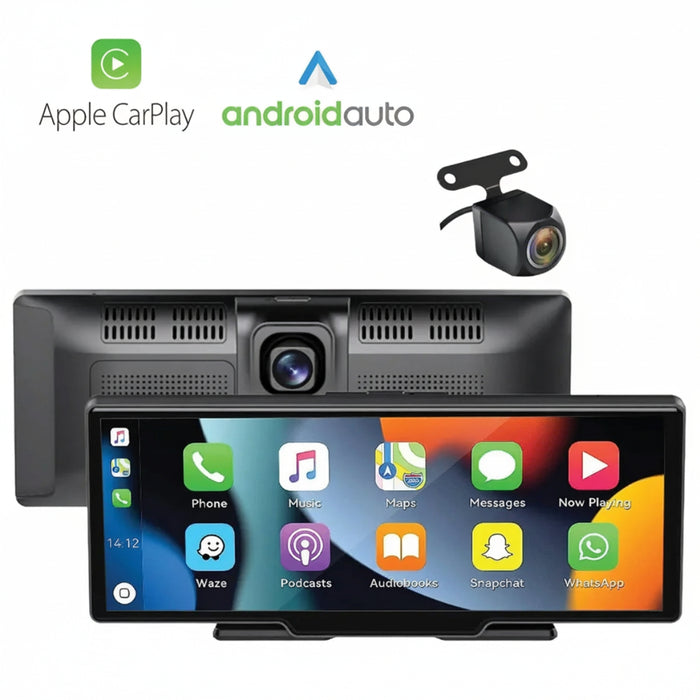
Add wireless Apple CarPlay or Android Auto to your dashboard without replacing the factory stereo. The S-Drive combines a 10-inch touch display with a built-in front dash cam and an included rear camera for recording and reversing. A 64GB microSD card is included.

Use supported apps from a compatible phone for navigation, music and calls. The display runs from the supplied 12V cigarette-lighter adapter; wireless phone pairing does not mean the screen or rear camera is battery-powered.

10-inch Display

CarPlay & Auto

Front & Rear

Wireless Pairing

64GB Included

Your phone’s supported apps on the dashboard

Bring your phone’s supported apps to the dashboard with wireless CarPlay or Android Auto. Pair a compatible iPhone or Android phone using Bluetooth and Wi-Fi. Apps, mobile data and subscriptions come from your phone.

Play audio through the built-in speaker, AUX or FM transmitter to suit your stereo. Screen mirroring is a separate viewing mode; use CarPlay or Android Auto for supported touch controls. The FAQ covers phone compatibility, mirroring and audio setup.

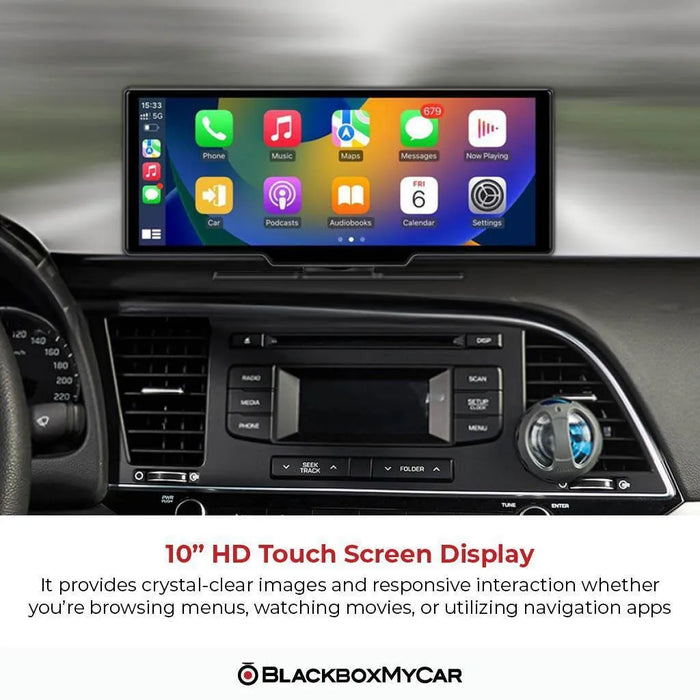
S-Drive display mounted above an existing car stereo with the CarPlay interface visible

Front recording and a rear view for reversing

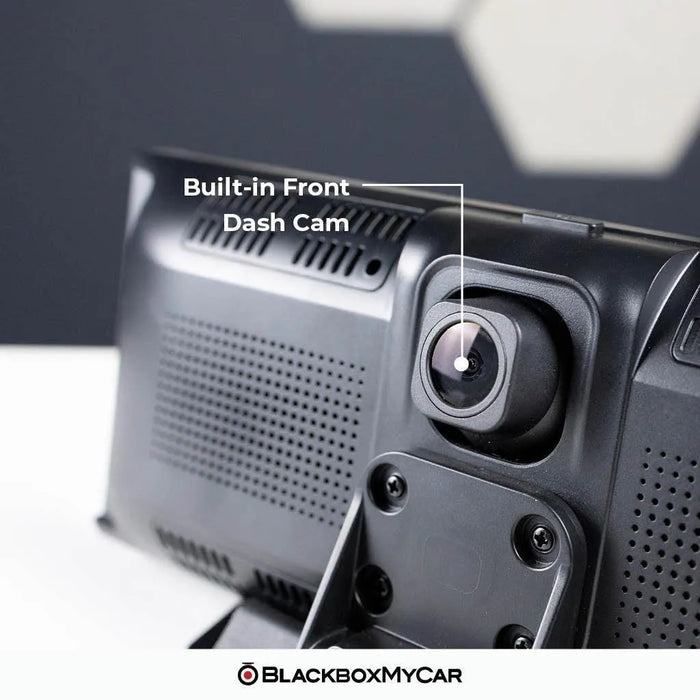
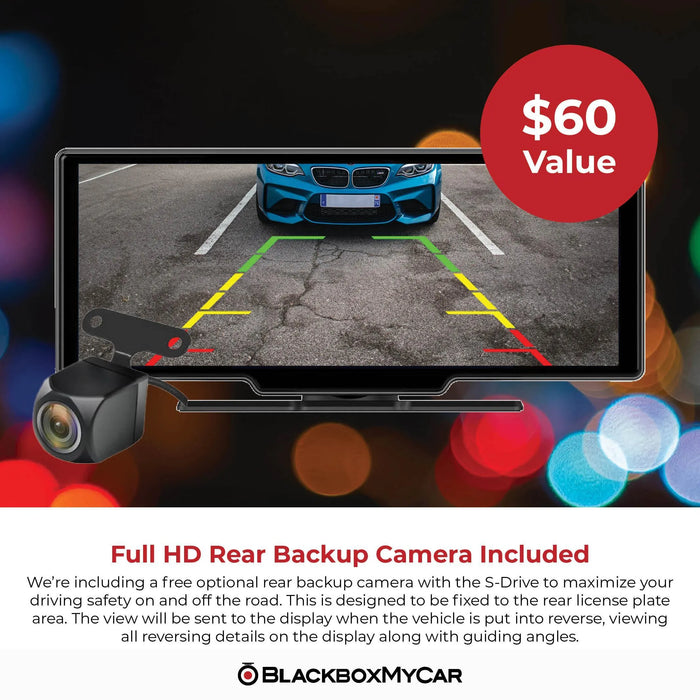
The front and rear cameras are specified at Full HD 1920 × 1080 and 25FPS. The front camera is built into the back of the display. The separate rear camera connects by cable and can be mounted near the license plate, following the installation guide.

For automatic reverse view, the rear camera’s trigger must connect to the vehicle’s reversing-light circuit. The guidelines can be adjusted on screen after installation. If you mount the rear camera inside the rear window, its higher angle may suit recording better than close-range reversing. Check the actual view before securing the mount. The display and front recording still work if the rear camera is not installed. A microSD card reader is useful for copying recordings to a computer. You can also use playback on the display or the Viidure app in Wi-Fi Video mode.

S-Drive front display and separate wired rear camera on a table

A simple screen with useful controls

The 10-inch IPS panel has a 1600 × 600 display resolution. It is a single-point touchscreen: use the on-screen plus and minus controls to zoom maps, rather than a two-finger pinch gesture. Adjust brightness and volume for the conditions, and set the display to turn off when you do not need it.

Voice controls can switch camera views or turn the display on and off. Enable both voice control and the microphone setting, then use a supported command such as “Show Rear Camera.” You can pair different phones over time, but disconnect the first phone before connecting another. Mount the unit where it leaves the road view and vehicle controls clear. Secure the power and camera cables away from airbags and moving parts. The front display plugs into a 12V socket; the reverse-light wiring is a separate installation step.

Single-touch S-Drive display showing a finger selecting a CarPlay app
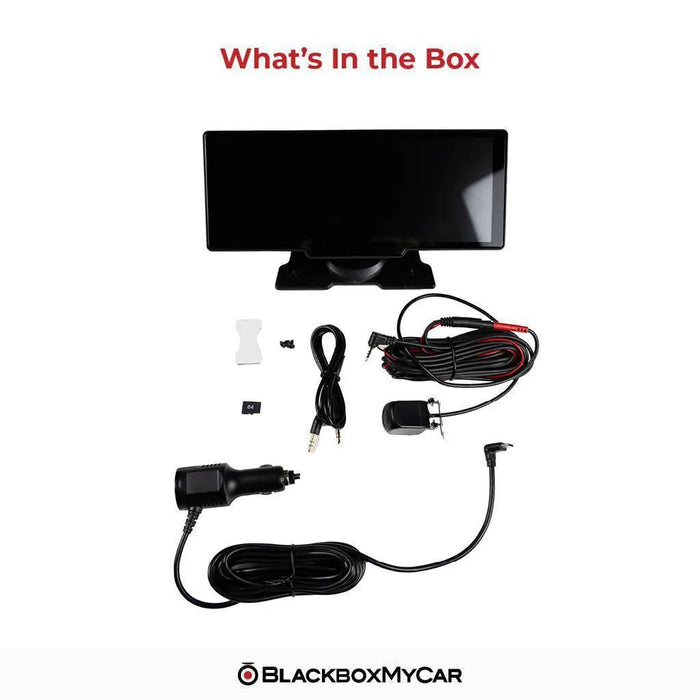
What's Included
  • S-Drive 10-inch display with built-in front camera
  • USB-C cigarette-lighter power cable
  • Rear camera, cable and mount
  • Monitor base
  • Rear connecting/extension cable, 6m (approximately 20ft)
  • AUX cable
  • 64GB microSD card
  • Product manual available by QR code
S-Drive package showing the display, rear camera and wiring, power adapter, AUX cable and microSD card
Specifications
Display 10-inch IPS, 1600 × 600 pixels
Included Memory Card 64GB microSD card included
Power Supplied 12V cigarette adapter to USB-C display input
Warranty One-year manufacturer warranty
Model / condition S-Drive 10 / new
SKU BBMC-SDrive10
Touch input Single-point; no pinch-to-zoom
Front camera 1920 × 1080 Full HD at 25FPS
Rear camera 1920 × 1080 Full HD at 25FPS
Recording format H.264 / MP4
G-sensor 3-axis; adjustable collision sensitivity
Phone interfaces Wireless Apple CarPlay and wireless Android Auto
Phone connections One active phone at a time
Wi-Fi 2.4GHz and 5GHz
Bluetooth Phone pairing
Audio options Built-in speaker, CarPlay/Auto, FM and AUX
Microphone / voice control Built in / supported commands in settings
Screen mirroring Supported; display cannot control the mirrored phone
Storage 32GB to 256GB microSD, Class 10 / U1; 64GB included
Parking mode Not supported
Rear view activation Reverse-light trigger wiring or manual camera-view selection
Rear connecting cable 6m / approximately 20ft
Display size Approximately 24 × 10.1 × 4.2cm, including camera lens
Height with stand Approximately 10.5cm
Base footprint Approximately 14.3 × 6.7cm
Operating range −20°C to 70°C (−4°F to 158°F)
Firmware identification M35 or M61, shown under Configuration in settings
Frequently Asked Questions

Which phones and apps work, and does it replace my stereo?

No. It adds a separate dashboard display. Use the built-in speaker, AUX or FM output to suit your existing audio system, and a compatible phone for CarPlay or Android Auto. Which phones work with wireless CarPlay or Android Auto? Use a compatible iPhone with CarPlay, or an Android phone that supports wireless Android Auto and 5GHz Wi-Fi. Google’s general wireless requirement is Android 11 or newer. Check the current phone requirements linked below and enable Bluetooth and Wi-Fi for pairing. Do I need to download apps onto the S-Drive? No. Supported CarPlay and Android Auto apps come from your phone. Not every phone app is supported, and some services need mobile data or a subscription. Screen mirroring is separate from those app interfaces.

How do mirroring, phone switching and touchscreen controls work?

No. Mirroring displays the phone’s content, but the S-Drive touch screen does not control the mirrored phone or its apps. Use the supported CarPlay/Android Auto interface for in-car app controls. Can two phones connect at once? No. Disconnect the active phone before connecting the next one. The system can be used with different phones, one at a time. Does the touchscreen support pinch-to-zoom? No. It uses a single-point touchscreen. Use the on-screen plus and minus buttons to change map zoom.

What do the cameras record, and can it monitor a parked vehicle?

The front and rear cameras are listed at 1080p and 25FPS. The rear camera also supplies the reversing view when installed with its trigger wire. Display resolution and camera recording resolution are different specifications. Does it have parking mode? No. The S-Drive does not offer dedicated parked-vehicle monitoring. Its time-lapse setting is not a substitute for parking mode. The system needs external power to operate. Does “wireless” mean there are no power cables? No. The phone connection is wireless. The display still needs the supplied cigarette-lighter power cable, and the rear camera connects by cable.

How do I install and activate the rear camera?

Yes. The display, phone interfaces and front camera work without the rear camera. You can install the rear unit later using its supported wiring and mount. Will the rear view appear automatically when I reverse? Yes, when the reverse trigger is correctly connected to the reversing-light circuit. Connecting only the video cable does not supply that trigger. You can also select the rear view manually or use the supported voice command. Can I put the rear camera inside the car? It can be mounted at the rear window for recording, but that higher angle may make close-range reversing harder to judge. The installation guide describes license-plate/rear-bumper placement. Check the view and cable route for your vehicle.

What memory card is included, and how do I save recordings?

A 64GB microSD card is included. The specified range is 32GB to 256GB, Class 10/U1. Recording requires a card; the phone-display functions can operate without one. Back up recordings before formatting. How do I save a recording? Power the unit off before removing the card, then use a card reader to copy files from the DCIM/VIDEO or DCIM/SOS folders. Alternatively, select Wi-Fi Video mode and connect through the Viidure app, download the clip, then export it from the app’s album. Playback is also available on the display.

How do I troubleshoot audio and voice controls?

Check the selected audio output and the volume on the phone, display and car stereo. FM and AUX settings can mute the display’s speaker. Select the output you intend to use and check its cable or radio frequency; Bluetooth phone pairing is not a universal direct link to a car’s speakers. Why are the voice commands not responding? Enable voice control and the separate microphone setting, use a command supported by the unit, and reduce background noise. The support guide gives “Show Rear Camera” as a camera-view command.

How do firmware updates, current support and warranty work?

Check Settings → Firmware → Configuration to identify M35 or M61, then use the matching file from BlackboxMyCar support. The documented update process uses PhoenixCard on Windows and a microSD card. Back up the card first, follow the instructions and restore the card after the update. Do not install the other hardware variant’s firmware. What if Android Auto disconnects after the March 2026 update? BlackboxMyCar provides a specific EveLink repair procedure using Android Cast mode and Wi-Fi Direct, followed by reconnecting Bluetooth and Android Auto. Follow the linked support instructions for that issue; this is separate from choosing an M35/M61 firmware image. What warranty comes with this S-Drive? This new unit has a one-year manufacturer warranty. If you are comparing conditions, ask us about the refurbished S-Drive’s tested condition, possible cosmetic wear and separate package terms. What should I know about this package before ordering? A compatible phone and any mobile service subscriptions are separate. Follow the included-items list for this order; no suction mount is promised.

Resources

S-Drive product videos

These videos show the original S-Drive/SmartDrive hardware. On-screen menus can differ with M35/M61 hardware and firmware. Use the current package and support information above for this order; older prices and promotions may have changed.

Manual, setup and current support

More reviews and guides

  • 5 stars: 21 (62%)
  • 4 stars: 11 (32%)
  • 3 stars: 2 (6%)
  • 2 stars: 0 (0%)
  • 1 star: 0 (0%)
J
Jason N. (United States)
Love this product

It was such an easy install, product definitely blew my expectations out of the water and I may need to purchase another & install it onto my other car someday!

A
Anonymous (Canada)
Surprisingly good

This is a pretty great unit to retrofit to an older car. It's been working reliably for us for a few months now, very handy, great value.

That said, I've got some thoughts if there ever happens to be a V2 model. These are all not a big deal and would increase the price but would be nice:

1. The provided base is relatively large but the 4 screws on the back of the unit are great. It meant I could 3d print my own bracket to convert it to a gopro mount. Bonus was I could level out the unit in the process to account for the curve of the dash. It would be awesome if the unit itself came with a molded bracket that was gopro compatible.
2. Having to disconnect one phone to connect a different one is annoying. It would be nice if it allowed you to have multiple phones paired and once and allow you to select which phone to use for Android Auto/Carplay.
3. It'd be nice if the front facing camera was detachable so you could mount it higher. You want the screen low so it doesn't block your view but then the camera gets low too.
4. The cables included all point in different directions from the right side of the unit. Having those consistent 90 degrees would be a little more polished.
5. A built in light sensor for auto-dimming of the screen would be a nice improvement over the current time-based dimming.

Overall very happy with this - they got a lot of things right, these are just my thoughts for making it even better.

Thanks for the detailed review! We’re really glad to hear your S-Drive has been working reliably and that you’ve found it a great fit for your vehicle. Your feedback and ideas are fantastic. We truly appreciate you taking the time to share them and are happy to know you’re enjoying the unit overall.

T
Tung S.T. (Canada)
BlackboxMyCar S-Drive 10" Wireless CarPlay & Android Auto

Very happy with this product. Automatically connect to my phone every time I jump into my car.

M
Mehdi F. (Canada)
Quick and responsive

I like the service and products from Blackbox. I bought a Thinkware for my other car, that has been working flawlessly in the last five years. For my new F150 that is an older model (2015) I needed a dash cam, but when I came across this product I realized for the price of a dual channel dash cam I can get more. So, I did not hesitate. The downside that made me not to give it 4 or 5 and was annoying for me is that this product is designed for older sedan cars. Power cable is not long enough for a truck, if you want to hide the wires. The red wire (backup camera function) is not long enough if you want not to install it around the license plate (in my case I installed it under the lights on the back of the cabin, since I already had a back up camera). Also, the base is not adjustable in anyway and is designed for a flat surface. In my case, I had a tiny flat edge for less than one inch where the base is about three inches. So, two inches of the base is just hanging in the air

K
Kaleb C. (United States)
The base is frustrating

I really wish this came with a normal suction base, it really does not fit anywhere on my dashboard and I've had to buy and test several mounting solutions from other stores before I can even try to install this. I'll update after to see if the actual electronics work well but mounting this thing is an absolute pain if you have no large flat surfaces on your dash like my 2013 kia soul+.

J
Jhoser J. (United States)
Good Product But Needs Improvement

I like it very much. Very upfront with its feature and what it can do. Carplay works good as well. The only thing and also extremely annoying is the clock does not seem to sync or automatically adapt to your location, thus affecting the night and day brightness. Every time it starts you always have to adjust/set the right time.

C
Customer (Canada)
Amazing product

Got it all installed amazing good and fast response

E
Emmanuel B. (United States)
Good for the price

The only thing I didn't like was the fact it didn't have a feature to flip the back up Camara. Took me a while to get it mounted and wired up to find out I couldn't flip it so had to reposition it. And since the mount is in a weird angle it wasn't just rotating it.

M
Mark
Simple way of adding new tech to older cars

This smartscreen device is perfect for olde vehicles that don't have modern touch screens. Installation is pretty simple, although you do have to run a couple of cables, including one to the rear of the car for the backup camera. This is the hardest part, but not too difficult if you take your time.

The screen quality is nice and bright, and can be adjusted easily. I was most happy with the wireless Carplay integration. The unit takes about 15 secs to boot up, and then another few seconds to wirelessly connect to my iphone.

Screen performance is nice and responsive to my touches. Dashcam quality is acceptable and will certainly help in the event that you need video evidence.

I like that there's a lot of options in terms of getting audio to/from the screen too. Overall this is a great addition to my older vehicle.

J
Jon
Elevate your ride

The BlackboxMyCar SmartDrive has transformed my driving experience. With seamless integration of Android Auto and Apple CarPlay, along with a high-resolution dashcam and backup camera, it offers convenience, safety, and peace of mind. The 10.26" display provides crystal-clear visuals, and the included 64GB microSD card ensures ample storage for recordings. A must-have for any car enthusiast!

J
Jon
Elevate your ride

The BlackboxMyCar SmartDrive has transformed my driving experience. With seamless integration of Android Auto and Apple CarPlay, along with a high-resolution dashcam and backup camera, it offers convenience, safety, and peace of mind. The 10.26" display provides crystal-clear visuals, and the included 64GB microSD card ensures ample storage for recordings. A must-have for any car enthusiast!

M
Mark
Simple way of adding new tech to older cars

This smartscreen device is perfect for olde vehicles that don't have modern touch screens. Installation is pretty simple, although you do have to run a couple of cables, including one to the rear of the car for the backup camera. This is the hardest part, but not too difficult if you take your time.

The screen quality is nice and bright, and can be adjusted easily. I was most happy with the wireless Carplay integration. The unit takes about 15 secs to boot up, and then another few seconds to wirelessly connect to my iphone.

Screen performance is nice and responsive to my touches. Dashcam quality is acceptable and will certainly help in the event that you need video evidence.

I like that there's a lot of options in terms of getting audio to/from the screen too. Overall this is a great addition to my older vehicle.

V
VK
Good upgrade to an older vehicle

This is a great combo device to upgrade your older vehicle.

It gives you android auto/ apple car play functionality, gives you bluetooth for music (some older cars have bluetooth for call only) via the FM transmitter, or via aux directly to your vehicle speakers, or you can just use the built in speakers on the screen... prob not the best option but its there. The screen is good quality too, pretty bright which is good for in vehicle screens when they are hit with sun.

There is a camera on the back side to act like a cash cam, and rear view cam can be set up, and you can even adjust lines for guidance... I didn't set up the rear view though since my vehicle has it.

The front cam quality is good to see what's happening, but you wont read license plates with it.

My only complaint is the mounting mechanism. The only option is tape, which is fine (although the option to suction it if you have the room for it would be awesome. The tape is quite strong, but since its on the dash board, it will be on a non-smooth or flat surface, so it's not going to be a perfect fit basically anywhere in my vehicle, and I bet most others would be the same... I'm not sure how to remedy this, but I would have liked to try and suction it to the windshield somewhere where my view isn't obstructed.

M
MSG
Modernize your older vehicle

I am really pleased with this system. I drive an older base model vehicle that doesn't have a reversing camera, or Android Auto. This system not only gives me the back camera for reversing, but also allows me to access my phone via touchscreen, and also provides a built in dashcam as well. It has completely changed the way that I drive. It isn't overly difficult to install the rear camera, but you could probably find someone to do it for you if you prefer. The screen itself is rather large, and that might present a problem for positioning, depending on how your dash is shaped. I can see this screen being a bit too large for a dash if you aren't used to having something there. Of course, you don't have to place this on your dash, if you have no need for the dashcam that is included. Android Auto was simple enough to set up. Takes about a minute or two to connect your phone once the car is turned on. Definitely appreciate having a map up on a big screen so I can easily glance at it while driving, versus relying on just the audio of my phone. This definitely minimizes using your device while driving which is always a great risk. I didn't know a device like this existed, but I am happy I found it. Android Auto, rear camera and a dashcam all in one has just upgraded my older vehicle.

L
L. M.
Clear and Colourful Screen

This dash cam is an easy install and use. Plug in and go. The screen is so bright and clear. You get a really great picture. I like the apple car play feature that allows you to see the important apple apps that you use when driving. Installing the rear facing camera was easy enough. You will just need to hide wires in various crevices , panels and under mats. I did find the screen to be a bit large. It could obscure some of your field of vision in certain vehicles. It may take some getting used to. I did find it to be user friendly.

J
James C.
Big screen!

The size of the screen on this is massive! A really wonderful responsive screen on this unit.
Limited mounting options included, likely because of the size and weight of the unit itself. Hard to offer a suction or vent mount because of the size and weight of the unit. The option included is an attached stand with an aggressive bottom. It does seem to stick well as the weight of the unit is balanced nicely over top. Once attached to its mounting place you can adjust the viewing angle of the unit.
Many options to get the sound to your vehicle, Bluetooth, fm or aux cable. I’m using the aux cable and the sound quality is great. My only real knock against this item is the boot up time. Takes 30-32 seconds from connecting to power before it connects to your devices and the CarPlay screen appears. This really shouldn’t take more than 20 seconds. Of well…. patience is a virtue I guess!

A
A1 R.
As expected

Works really well and syncs with phone easily. Fast software.

I
I. M.
Some instructions missing

Overall this is a good product but some instructions are missing from the manual

E
E. B.
So far, so good.

I had ordered this "Blackbox My Car" device primarily for the front dashcam and backup camera, which my current Volvo doesn't have. (I have OEM navigation and bluetooth stereo with controls on my steering wheel.) While the touch screen is beneficial for safer, "eyes on the road" driving, vs. fiddling with controls on my phone, I am sacrificing a little bit of visibility, due to my high dashboard and where unit itself needs to be positioned. (Unfortunately, I do not have many options regarding where the device can be placed.) I do like having the touchscreen convenience of Pandora and the sound through my car speakers is awesome!

The unit itself is a nice size and was quick to engage with my Android phone via bluetooth; streaming through my car speakers was equally simple. A split screen is available (as you can see by my image), so channels and map can be displayed simultaneously. The map will provide me with any live time traffic delays which is beneficial and of course, the dashcam video is available to record activity as well as disengage. An image of the dashcam in action is posted (sorry about the reflection!). It is clear with good resolution; the brightness can be adjusted manually and it also offers an auto dim for nighttime use.

Those who have a lower profile dashboard design or can raise their seat high enough to comfortably clear the approximate 4 inch height of the display can maintain good visibility; I lost a little, due to the height of the unit and the angle of ny seat, but it's something that I can live with, albeit slightly reluctantly.

I will post an additional image of the backup camera in action, once I do the final segment of the installation and will revise my review accordingly.

P
Paul
Screen looks great!

The device has been working flawlessly so far and it's much better than having to fiddle with my phone mounted on a shaky mount. The fm transmitter is ok but the sound quality is a bit muddy so I'd recommend just using the 3.5mm cable instead or bluetooth if ur car has it. The only annoying thing is that my car has an always on cig lighter port, so the device doesn't turn off even when I turn off the car and I have to unplug the power. It'd be nice if there was a hardwire option as well, which is probably something that I'm going to try and find a USB C kit that works with it.

P
Paul
Screen looks great!

The device has been working flawlessly so far and it's much better than having to fiddle with my phone mounted on a shaky mount. The fm transmitter is ok but the sound quality is a bit muddy so I'd recommend just using the 3.5mm cable instead or bluetooth if ur car has it. The only annoying thing is that my car has an always on cig lighter port, so the device doesn't turn off even when I turn off the car and I have to unplug the power. It'd be nice if there was a hardwire option as well, which is probably something that I'm going to try and find a USB C kit that works with it.

L
Leanna
Love the cameras

Put thus in my work van. Soon as you turn on the camera starts recording. Easy to install. Easy setup. GPS and music plays thru van speakers. Such a low price.

T
Tommy G.
Great for my Honda

Great for my Honda

E
Esther
Simple to install and use

I like how easy it was to set up and carplay boots up pretty quickly once I start the car. The screen looks beautiful even tho it kind of doesn't blend in that well within my older car. (Kind of reminds me of London where you'll have a random new building between old, rustic buildings lol) Have not installed the rear camera yet, but so far being able to control my spotify and navigation on the screen has been great.

S
S-Drive 1.

I cant find the settings to rotate my main screen 180 degrees.

BlackboxMyCar

Unfortunately, this is not possible with this product.

Loading add-ons...