Installing a VIOFO A329T 3CH into a 2024 Toyota Sienna XSE Hybrid
TLDR: Here at BlackboxMyCar, we often get the question, “How do you install a VIOFO telephoto camera?” In this blog, we’ll answer that question by installing the.
Here at BlackboxMyCar, we often get the question, “How do you install a VIOFO telephoto camera?” In this blog, we’ll answer that question by installing the VIOFO A329T 3CH dash cam into a 2024 Toyota Sienna XSE Hybrid.
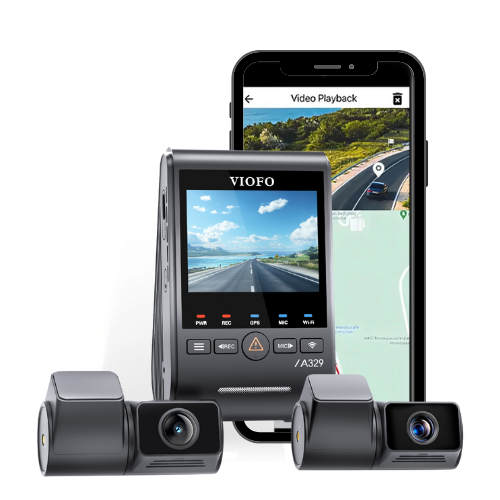
The VIOFO A329T is a bit of a unique situation in the world of 3-channel dash cams, as the third camera serves a different purpose. While in most 3-channel dash cams, the third channel is used to record inside the vehicle’s cabin, the A329T features a telephoto camera with 4X optical zoom instead.
This setup is ideal for drivers who want a clearer capture of subjects further in the distance, whether it’s to catch a culprit speeding away after a hit-and-run or to surveil distant activity while in parking mode.
Now, before we install this triple-channel dash cam into the Sienna, note that if you don't want to use parking mode, you can use the included cigarette lighter adapter for a simpler installation. However, we do recommend hardwiring your dash cam so it can continue recording even when the vehicle is turned off.
1 /
For hybrid vehicles like this Sienna, we also recommend using a battery pack due to their smaller batteries. Smaller batteries have less power capacity, which translates directly to less parking-mode recording. However, the VIOFO A329T also features a new Hybrid Parking Mode, which allows it to automatically reduce power consumption for more parking-mode recording, with or without a battery pack.
The first step is to locate your vehicle's fuse box or power source. This Sienna is just like any other modern Toyota, with the fuse box located underneath the dashboard, in this case, on the driver’s side.
As with all modern VIOFO hardwiring kits, the VIOFO HK6 uses a 3-wire connection. This setup will allow the camera to know whether the vehicle is running or not, and to go in and out of parking mode accordingly. Using a circuit tester or multimeter, test out different fuses to look for an ACC and a constant fuse; you can easily differentiate these fuse types. If it provides power even when your ignition is turned off, it’s a Constant. If it doesn’t provide power, then it’s ACC.
Unlike its predecessors, however, the HK6 has a modular design, where the input and output cables can be detached from the inline power module. The power module is usually what makes hardwiring a VIOFO dash cam more challenging than others, but this welcome improvement makes it much less of a challenge than before.
1 /
During this step, we started by connecting the input cable’s yellow ACC wire to our chosen ACC fuse, and its red Battery wire to our chosen Constant fuse. We then connected the black Ground wire to a suitable grounding point. The grounding point should be bare metal, such as an unpainted bolt going into the vehicle’s dash structure.
For this Sienna, we found and used a factory grounding point behind a trim panel on the driver’s side of the dashboard, right next to the door hinge. Lastly, we finished by plugging the input cable into the HK6’s power module.
Do consult your vehicle’s fuse diagram or owner’s manual to determine which fuse slots are safe to tap into, as you shouldn’t use any of the fuse slots for any of your vehicle's critical components, such as the airbags and engine modules, for safety reasons. Also, make sure the amperage of the fuse you’re adding is equal to or lower than the original fuse you’ve chosen. Like most modern Toyotas, the 2024 Sienna Hybrid uses low-profile mini fuses. Learn more about Add-a-Fuses here.
Step 2: Mounting the Front Camera on the Windshield
Next up, we will mount the A329T’s front camera. Ensure to check the camera’s live-view to ensure the best positioning and viewing angle, and that it’s in range of the windshield wipers. This can either be done through the VIOFO App or the front camera’s built-in LCD screen. The owner of this Sienna wanted the front camera hidden from their point of view, so we mounted it over the dot matrix patch on the passenger side to conceal it behind the rearview mirror.
Once the optimal position has been determined, wipe down the area with a basic windshield cleaner, both the outside and inside, to ensure that the view is unobstructed and the adhesive sticks well. Slowly remove the adhesive tape's backing from the GPS mount. Then, after you've adhered it to the windshield, hold the adhesive against the windshield for about 30 seconds to allow for a strong bond.
Step 3: Wiring the Front Camera
Now that your front camera is mounted, it's time to get it wired up. Starting from the camera, we plugged the USB-C connector of the HK6’s output cable into the GPS mount and removed the plastic sensor housing from behind the rearview mirror. We wired across from the passenger’s side of the windshield, tucking the cable into the headliner using a trim tool, to the driver’s side A-pillar.
1 /
From here, it’s just a matter of loosening the A-pillar trim to ensure the cable can be safely routed down the A-pillar. You can use the trim tool to do this; just ensure you’re careful to avoid breaking the trim or any clips that hold it on.
Once done, it’s important to ensure the cable is routed behind the airbag, rather than over it, to ensure it isn’t obstructed in the event of a collision. Then, simply route the output cable down and through the side of the dashboard until it comes out at the bottom, and finish off by plugging it into the HK6’s power module
Step 4: Mounting and Wiring the Telephoto Camera
It’s time to mount the VIOFO A329T’s Telephoto Camera. In this case, mounting the telephoto camera is just like mounting the front camera, the only difference is that it’s zoomed in to capture 4X further down the road. Since the owner of this Sienna also wanted it hidden from their point of view, we mounted it up high next to the front camera so it, too, can be hidden from the driver’s perspective by the rearview mirror.
We also have two lengths of connecting cables as part of this three-channel system. We'll be using a short 3ft/1m coaxial cable to connect the front-facing camera to the telephoto camera. Then there's a longer, 20ft/6m coaxial cable that will connect to the rear-facing camera.
After connecting our front-facing main camera to our telephoto camera, the next step will be to tuck the excess wire into the headliner.
Part 5: Mounting and Wiring the Rear Camera
Following the front and telephoto camera, we'll move on to the rear camera. Start by connecting its cable to the front camera, then run it across to the driver’s side A-pillar, tucking it into the headliner.
Once there, ensure the cable is routed behind the airbag, then run the cable along the van's B-, C-, and D-pillars, removing the rubber door seals and loosening trim panels for easy access, steering clear of any airbags.
Like many modern minivans, the 2024 Sienna Hybrid has fairly large C- and D-pillar trim panels, each held on by several plastic clips, so it’s important to take extra care when loosening these to avoid any potential damage.
Since the Sienna has a rear liftgate, we had to wire through one of the rubber grommets connecting it to the rest of the vehicle. After choosing a grommet to wire through by squeezing each one to feel how much wiggle room is inside, it should be loosened first. After loosening the grommet on both sides using a trim tool, we removed the plastic trim at the top of the liftgate opening to access the grommet’s entrance.
On the liftgate, we removed the third brake light assembly to access the grommet’s exit. The electrical connector attaching this to the vehicle’s main harness must be carefully unplugged, as doing otherwise will risk breaking it. For this install, we fished the cable from the van’s body, through the grommet, and out into the liftgate.
1 /
Next, install the rear camera on the rear window. Since this Sienna’s third brake light protrudes into the rear window, we mounted it offset to the left to minimize the amount of exposed wiring while keeping it as centred as possible, within the rear wiper’s range at that. Note that it should not be installed on top of the rear defroster lines or with any blocking its view.
As with the front camera, we recommend you check the live view of the rear camera before mounting to ensure it’s working and positioned properly.
If you have any extra slack or excess cabling in your rear cable, we recommend bundling it up using electrical tape or a zip tie and tucking it away between the headliner and roof panel.
Part 6: Cleaning Up
Finally, all three cameras have been installed and connected, and the system has been hardwired to the fuse box. The final step is to start the van, test this three-channel system's functionality, and adjust its settings.
Check if the dash cam turns on automatically, as well as noting if it goes into parking mode when the van is shut off. If it doesn't turn on, check the power connections and ensure the dash cam is properly mounted. If it doesn’t go into parking mode, make sure it is enabled in the settings, and that the low-voltage cutoff threshold on the power module isn’t set too high.
Now that our cameras are installed and wired up, it’s time to clean up any loose wires and reinstall any trim pieces, door seals, and grommets that were removed.
We're Done!
And that's how you hardwire the VIOFO A329T 3CH into a 2024 Toyota Sienna Hybrid! With this installed, you can now enjoy not only the high-quality front and rear recording that VIOFO is famous for, but also the added protection of a 4X Telephoto Camera and Hybrid Parking Mode.
If you need assistance installing a dash cam into your Toyota Sienna or any other vehicle, please send us your questions, and our team will gladly assist you! If you’re in the Vancouver, Canada area, you can also directly schedule an appointment with our professional installers at BlackboxMyCar. Book Appointment
✓ True 4K + 2K triple-channel coverage. Front camera uses Sony STARVIS 2 IMX678 1/1.8" 8MP sensor for stunning 4K clarity, while the dedicated 2K telephoto and 2K rear cameras deploy IMX675 sensors, capturing license plates, faces, and road details from multiple angles simultaneously.
✓ 4X optical zoom telephoto camera. A dedicated second front-facing 2K camera with real 4X optical zoom captures distant details that standard dash cams miss entirely, license plates, street signs, and vehicles far ahead become crystal clear.
✓ Sony STARVIS 2 on all three channels. Triple STARVIS 2 sensors with HDR deliver 2.5x wider dynamic range than previous generation sensors, exceptional low-light and nighttime performance across front, telephoto, and rear cameras where cheaper setups produce grainy, unusable footage.
✓ Intelligent low-power parking mode. Impact detection triggers recording only when incidents occur, with the camera switching to ultra-efficient standby when your vehicle is off, perfect for long-term parking without draining your battery.
✓ Supercapacitor reliability for extreme conditions. No lithium battery means consistent performance across operating temperatures from -20°C to 65°C and storage temps from -20°C to 70°C, built for years of dependable service in hot summers and freezing winters.
Recommended products
These current products fit the practical needs covered in this guide.