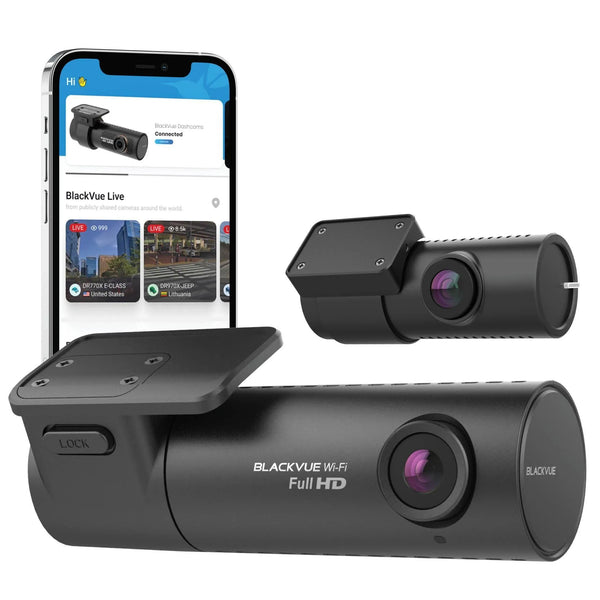
Installing a BlackVue Elite 9 2CH + CM100G LTE Module + B-130A Battery Pack into a 2025 Porsche Taycan 4S
TLDR: The Porsche Taycan brings Porsche’s driving dynamics to an EV, and this installation pairs it with the BlackVue Elite 9 2CH for front-and-rear recording.
Over the past few years, we’ve noticed that the Porsche Taycan has become one of the most popular EVs on the market as owners can enjoy Porsche’s world-renowned driving dynamics, engineering, and craftsmanship without burning a single drop of fossil fuel. We’ve also noticed that BlackboxMyCar has become one of, if not the most trusted, dash cam suppliers and installers within our local Taycan owner community. We’ve even been recommended on a large Taycan owners’ forum with over 13,000 members!
It’s no surprise that the owner of this Taycan came to us to get it protected with the BlackVue Elite 9 2CH, one of the latest flagship models to hit the market. Unlike the older DR series it’s replacing, the Elite series is all about enhancing the BlackVue experience and remaining competitive with both established and new players in the industry.
The Elite 9 packs dual Sony STARVIS 2 sensors with HDR, with a 4K IMX678 up front and a 2K IMX675 around back. In addition to having all the BlackVue features we know and love, such as Cloud connectivity, support for up to a 1TB microSD card, and a 2-year warranty, it also features BlackVue’s new Power-Saving Parking Mode.
The owner of this Taycan has opted to add both the BlackVue CM100G LTE module for Cloud connectivity, regardless of their location, as well as the BlackVue B-130A battery pack, which provides up to 12 days of real-world runtime in Power-Saving Parking Mode.
In this blog, we’ll cover the many different intricacies of installing a dash cam system, especially when working with an electric vehicle. For this installation, we brought in our specialty vehicle installer, who spent the full day completing the installation.
1 /
Step 1: Mounting the Front Camera and LTE Module
The first step in installing a dash cam is always deciding where it will go. Our go-to is always on the passenger side of the vehicle, hiding the body behind the rearview mirror. Like many Volkswagen Group vehicles, the Taycan has a relatively thin “stem” that the rearview mirror attaches to, allowing the camera to be fully hidden from the driver’s view behind the mirror.
We recommend temporarily powering the camera through the cigarette lighter or a suitable USB-C port and pairing it with your phone. Through the BlackVue App, you can live-view the camera to determine the ideal mounting position and viewing angle for the camera.
Once you've decided on the position, clean the windshield area with a microfiber cloth and some windshield cleaner to ensure no residue interferes with the camera adhesive on the inside, and no dirt or grime interferes with the camera’s vision on the outside. Peel off the adhesive backing from the mounting bracket and press it firmly onto the windshield for about 30 seconds to ensure a strong bond.
1 /
Since the owner of this Taycan also opted for the CM100G LTE module, there’s an extra step to get it installed and wired up. Since the LTE module has to sit on a glass surface to receive its cellular signal, and only comes with a short, permanently-attached cable, we chose to mount it in the top right corner of the windshield to ensure it’s as unobtrusive as possible.
Step 2: Mounting the Rear Camera
While we would normally focus on hardwiring the battery and connecting it to the front camera, given its distance, we can focus on mounting the rear camera instead. This will allow us to run both the battery pack output cable and the rear camera cable together.
1 /
Before we start on the wiring, we have to mount the rear camera. With the same process as the front camera, power up the rear camera by plugging it into the front temporarily, and use the in-app live-view to determine the best position. Make sure not to install on any defroster lines or with those lines blocking the camera’s vision.
For this 2025 Porsche Taycan, we installed the rear camera on the passenger side of the rear window, as a large housing for the third brake light protrudes into the top edge, resulting in the rear camera being too low if centred. Once you’ve decided on a proper position, peel the adhesive backing and mount the camera, after wiping down the window first, of course.
Step 3: Wiring the Cameras and Battery Pack
With the cameras mounted, let’s get them wired up, starting from the front camera. Gathering the battery pack cable along the rear camera cable, we can run them together, all the way to the rear camera and battery pack in the rear.
Since this particular Taycan is a sedan, this was straightforward, we ran both cables through the headliner on the passenger side, ensuring to steer clear of any airbags, with the rear camera cable coming out at the rear edge of the headliner, and the battery pack cable going into the trunk.
Unlike most of our installations, we opted to leave the slack at the front of the car rather than the rear; this is because this particular Taycan had a panoramic sunroof, which didn’t leave too much space at the rear edge of the headliner, where we usually hide excess wiring.
The next step is to wire up the battery pack. Start by hardwiring it to the vehicle’s fusebox using the included ACC Hardwiring Kit and Add-a-Fuse Kit. In the 2025 Porsche Taycan, the fusebox is located on the rear right wheel well, behind some side panelling.
This is a far cry from the typical fusebox locations in the front of the vehicle or in the trunk, which will require the removal of more panelling than usual for access. Using a circuit tester or multimeter, test the vehicle's fuses to find one that only stays on when the vehicle is on and is rated between 20 and 30A for the battery pack.
For any hardwiring connection, you’ll also need to find a suitable ground point. This is typically an unpainted metal bolt or stud in the vehicle, near the fusebox, to which the metal ring on the ground wire is attached.
1 /
As for the battery pack itself, we mounted it inside a hidden compartment at the rear edge of the trunk. To get the hardwiring and output cables from the camera and fusebox to the battery pack, we followed some pre-existing cabling along the side of the car while the trunk panels were removed, and fished it into that compartment through some gaps in the plastic trim. And with that, everything is wired up!
Step 4: Test the System
Of course, after mounting and wiring, we want to test the system to make sure it's working properly. Turn on the car and check if the dash cam turns on automatically. If it doesn't, check the power connections to both the dash cam and the battery pack. You will also want to turn the car off to ensure the battery pack stops charging and sends the dash cam into parking mode.
Step 5: Clean It Up
Finally, now that our cameras are installed and the wiring is all done, let's clean up the wires. You can use electrical tape or cable clips to bundle any excess wiring, secure it in a suitable location, and reinstall any interior panels that were removed. For this installation, most of the excess wiring was up front, so we ended up securing it to a factory wiring harness running up the passenger side A-pillar, away from the side airbag.
And there we have it, a BlackVue Elite 9 2CH + CM100G LTE Module + B-130A Battery Pack installed into a 2025 Porsche Taycan 4S. If you need assistance with installing a dash cam in your Porsche Taycan or any other vehicle, don’t hesitate to reach out to our support team. We’re always ready to help.
If you’re in the Vancouver, Canada area and need help from our professional installers, give us a call to schedule an appointment or email us at info@blackboxmycar.ca.
✓ 4K clarity that captures everything. Professional-grade 12-bit 4K sensor processing over 68 billion colors, sharp enough to catch license plates, faces, and road details that lower-resolution cameras miss entirely.
✓ Sony STARVIS 2 night performance. Dual STARVIS 2 sensors with HDR on both 4K front and 2K rear cameras, handles low-light and nighttime recording where cheaper cameras just give you grainy, unusable footage.
✓ Reliable parking mode. Impact detection with 10-second pre-event buffer that captures what happened before the hit, not just after. Ultra-low power draw (under 1mA in Power Saving Mode) protects your battery during extended parking.
✓ Built to handle extremes. Supercapacitor design (no lithium battery) withstands storage temperatures from -20°C to 80°C and delivers consistent, reliable performance over years, not months.
✓ 30 hours of parking protection on a single charge. High-capacity 7,500mAh (96Wh) power that keeps your dash cam recording all day and night, without touching your car battery.
✓ 50-minute rapid charging. Goes from empty to full in under an hour when hardwired, no more waiting overnight just to use parking mode the next day.
✓ LiFePO4 safety built in. Lithium Iron Phosphate chemistry is inherently fire and explosion resistant, handles extreme vehicle temperatures where standard lithium batteries become a liability.
✓ Smart monitoring via the BlackVue app. Check battery status, charge level, and remaining runtime wirelessly from your phone. No guessing when you'll run out of juice.