
Skip to content
SKU BV-BTC-1C

BlackVue Tamper-Proof Case

Availability:
Low stock
Availability:
Out of stock
Save 15% Save 15%
Original price $39.99
Original price $39.99 - Original price $39.99
Original price $39.99
Current price $33.99
$33.99 - $48.00
Current price $33.99
Best Price Guaranteed
Select Model
Every order includes:

Chat with an expert

Talk to a dash cam expert before you order.

BlackVue Tamper-Proof Case: BTC-1C or TP-E

Keep the front camera’s memory card, cable connections and viewing angle behind a screw-fastened case. It helps restrict physical access in shared vehicles, rental cars and fleets. Choose BTC-1C for the listed X-Series cameras or TP-E for ELITE 8, 9 and 10.

Use the included Allen wrench when you need to access the camera for maintenance.

Restricted Access

Allen-Key Fasteners

Model-Specific Fit

BTC-1C for listed X-Series cameras

BTC-1C fits the standard DR970X, DR970X Plus, DR770X, DR900X, DR900X Plus, DR750X and DR750X Plus front cameras. The BTC-1C revision supplied here is confirmed to fit the standard DR970X Plus. LTE and Box housings use different arrangements.

Once fitted, its housing covers access to the card slot and cable connectors and limits rotation of the front camera. Undo the case screws with the Allen wrench when you need to reach the card or connections.

BlackVue lists a windshield angle of 5°–90° from horizontal for BTC-1C. Check the mounting position, cable clearance and camera view before securing the final angle.

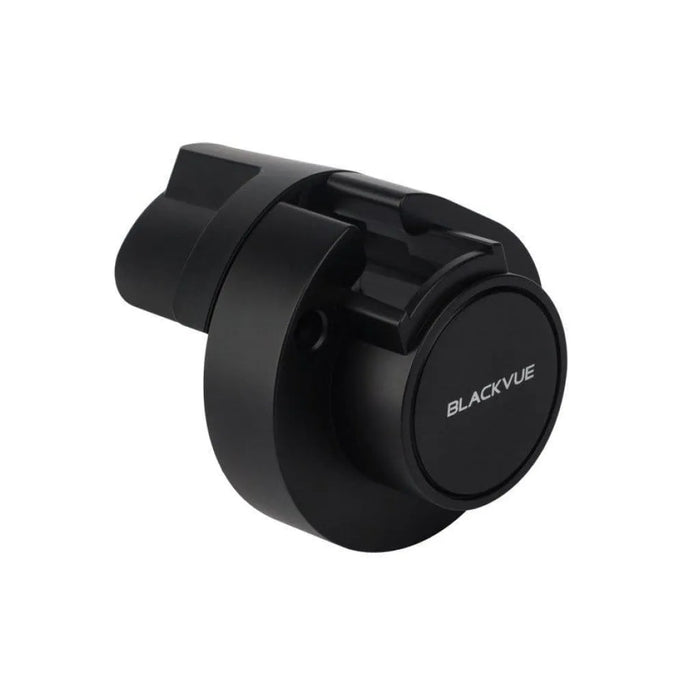
BlackVue BTC-1C case with its model marking and mounting bracket

TP-E for ELITE 8, 9 and 10

TP-E matches the ELITE front-camera housing, including the BlackVue ELITE 8 dual-camera system.

To install TP-E, unplug the camera and remove its original mounting bracket. Slide the left case bracket onto the camera until it clicks, reconnect the cables, align the right cover and tighten the two case screws with the Allen wrench. Mount the assembly on the windshield, set the viewing angle and tighten the bracket screw. The illustrated manufacturer guide below shows each step.

TP-E supports a 5°–90° windshield angle from horizontal. Check a saved recording after installation. Authorised wireless access remains available, so manage app and account permissions separately from the physical case.

BlackVue TP-E case with its model marking and mounting bracket
What's Included
  • One selected BTC-1C or TP-E case, with left bracket and right cover
  • Case fasteners
  • Allen wrench
Specifications
Case options BTC-1C or TP-E; select one
BTC-1C fit Standard DR970X / DR970X Plus / DR770X / DR900X / DR900X Plus / DR750X / DR750X Plus front cameras
TP-E fit ELITE 8, ELITE 9 and ELITE 10 front cameras
Windshield angle 5°–90° from horizontal for both options
Access control Physical cover for microSD card slot and cable connections; limits camera rotation
Fasteners Allen-head case screws; Allen wrench included
Colour Black
TP-E handling Special order: 7–10 business days before shipment
Warranty 2-year manufacturer warranty, honored by BlackboxMyCar
Frequently Asked Questions

Which case should I choose?

Choose BTC-1C for the listed standard X-Series cameras and TP-E for ELITE 8, 9 and 10. Read the complete model name on the camera; LTE, Box and later revisions can use a different housing.

Does the supplied BTC-1C fit the DR970X Plus?

Yes. The BTC-1C revision supplied here fits the standard DR970X Plus. This does not establish compatibility with a DR970X LTE Plus, Box model or a different generation.

Does BTC-1C fit LTE or Box cameras?

No. Those housings require their own compatible solution. Do not choose a case solely because the dash cam name contains DR970X or DR770X.

Does TP-E work with a single-channel ELITE camera?

Yes. TP-E fits the supported ELITE front-camera housing. It is not limited to a two-channel package, and it does not include a rear-camera case.

Will either case work with an upright windshield?

BlackVue specifies 5°–90° from horizontal for both BTC-1C and TP-E. Check that the camera can achieve the intended view with enough room for its cables at your chosen mounting position.

Does TP-E fit over the original mounting bracket?

No. Remove the original bracket and slide the TP-E left bracket onto the front camera. Reconnect the cables, attach the right cover, tighten its screws and then secure the camera angle. Follow the illustrated TP-E guide below.

Can I still remove the memory card?

Yes, for maintenance. First undo the case fasteners with the included Allen wrench to reach the card slot. Follow your dash cam’s shutdown procedure before removing its memory card.

Can I still use the BlackVue app?

Yes. The case restricts physical access; it does not disable authorised wireless app access. Features still depend on your dash cam, account and connection.

Does the case guarantee that footage cannot be deleted?

No. It restricts access to the physical card and cables. App permissions, account security, storage overwrite settings and backup practices still determine who can access footage and how long it is retained.

Is this a theft-proof enclosure?

No. It adds a physical barrier at the front camera but does not secure the whole vehicle or make the windshield mounting point theft-proof.

Are the camera and both case models included?

No. You receive one case in the selected model with its fasteners and Allen wrench. The dash cam is a separate purchase.

How long does the TP-E option take to ship?

TP-E is a special-order option with 7–10 business days of handling before shipment. Contact us to arrange the order; transit time follows handling.

What warranty coverage applies?

This accessory has a two-year BlackVue manufacturer warranty, which BlackboxMyCar honors. Our default retailer coverage is six months unless otherwise stated; it does not shorten this product’s two-year manufacturer coverage.

Resources

Video guides and reviews

BlackboxMyCar warranty, returns and exchanges

  • 5 stars: 2 (33%)
  • 4 stars: 3 (50%)
  • 3 stars: 0 (0%)
  • 2 stars: 0 (0%)
  • 1 star: 1 (17%)
Y
Y B. (United States)
Not Returnable

I got the item and saw that it's not compatible. When I asked to return it, the customer support representative told me accessories are not returnable.
However, on the product page, it says free returns; on the order page, the refund policy does not mention anything about accessories not returnable.
The representative claims on the website (desktop version) the free return option redirects you to the return policy but on the mobile version (Safari on iOS) it does not redirect to anything!

Insane!! Will never touch this website again!

J
Jacob W.(.M.S. (United States)
Great product but rear camera doesn’t have one.

Got one of these for the 900x plus but they don’t have one for the inside camera facing the driver. Lol. That’s half the point of this setup.

I
Ian M. (Canada)
Great product

Excellent product! Helps prevent pesky dealers from pulling out wires that they shouldn't be touching. Highly recommended.

C
Customer (Canada)
Overpriced, but works well, and probably worth it if you need it.

Since buying my first dashcam, I've had it unplugged by different mechanic shops three times. I finally decided to get this case to prevent it from happening again after having strong suspicion that a dealer took my car on a joyride, but ending up with no way to prove it. The case fits the DR900X pretty well, though it doesn't fit as nicely as the original mount. As with most Blackvue products, it definitely should not be as pricey as it is. $50 for a bit of plastic and metal is crazy, but there really aren't many other options if you need to secure your camera.

As others have mentioned, it would also have been nice to have a small access hole to press the wifi button without removing the case. It's possible to get a small screwdriver in around the plugs to press it, but it takes a bit of patience sometimes. I'll probably end up just drilling a small hole myself.

B
Brett H. (United States)
Great, simple product but needs improvement

The concept of this tamper-proof case is simple and effective. However, for people like me that don't want to leave the wifi on or off all the time it would be handy to have a small hole over the wifi button for a paperclip or something to turn it on or off. At this point I use a very small screwdriver to carefully go in and push the button.
I'd give it 5 stars if it weren't for this inconvenience.

J
Jason F. (United States)
Just what I needed

Took awhile but I found a great dash cam with a great way to lower tampering issues. It is well setup and while no method is perfect I needed something that at least discouraged tampering and this does just that. It keeps both the power cable and the rear view camera cable in place and prevents rotation. It also stops removal of the memory card and being able to push the wifi button. It perfectly addressed everything I was looking for.