Skip to content
SKU BBMC-SPLICED-TK-HK

Thinkware Spliced Battery Output Cable

Availability:
in stock, ready to be shipped
Original price $50.99 - Original price $50.99
Original price
$50.99
$50.99 - $50.99
Current price $50.99
Best Price Guaranteed
Every order includes:

Chat with an expert

Talk to a dash cam expert before you order.

Thinkware Spliced Battery Output Cable: 4.5m

Connect a compatible dash cam battery pack to a Thinkware camera with one pre-spliced cable. BlackboxMyCar joins the battery output lead to a Thinkware hardwire cable in-house, so the assembly carries constant power, ground and the ACC signal used for automatic parking-mode switching.

The complete cable is 4.5m long, approximately 15ft. It powers the camera from the battery pack; it does not charge the battery pack from the vehicle.

Pre-Spliced

Parking Signal

4.5m Cable

Battery power with the parking-mode signal

The assembly combines a three-wire battery output lead with the standard Thinkware hardwire cable. It connects to the matching output port on a PowerCell 8, Cellink NEO, BlackVue B-124/B-124X/B-130X/B-130A, VIOFO BP100 or a supported Thinkware iVOLT BAB-50 setup. This is the Thinkware-camera output option, not the cable supplied for a BlackVue or VIOFO camera.

The ACC connection lets the battery pack tell a supported camera when the vehicle switches off. Enable parking mode in the camera, install the battery’s own charging connection according to its manual, and check that the camera returns to driving recording when the vehicle starts. Recording modes and runtime depend on the camera, settings and battery charge. Measure the route from the battery location to the front camera, including bends around trim. Keep the wiring clear of airbags, moving parts and sharp edges. This assembly arrives pre-spliced; you do not need to join its output wires yourself. If an existing installation needs modification, identify the wire functions by their labels rather than matching colours.

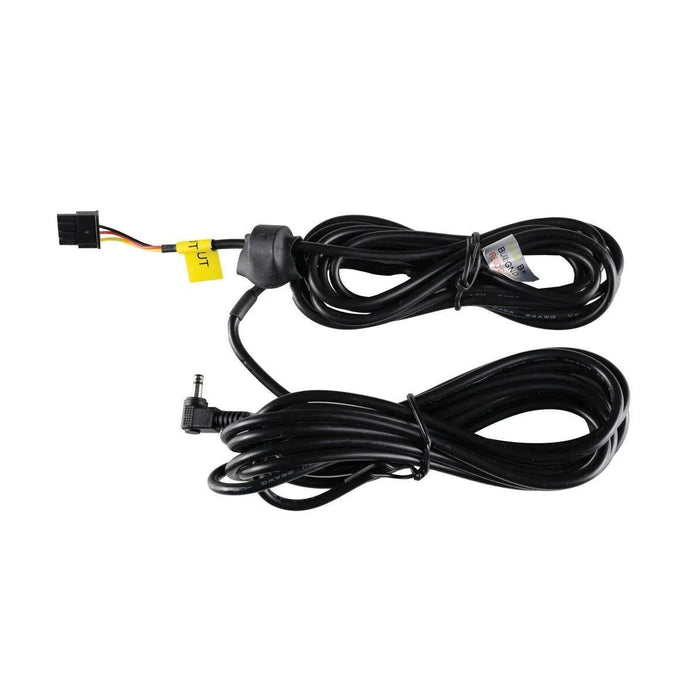
Pre-spliced Thinkware output cable showing the battery connector, joined leads and right-angle camera power plug
What's Included
  • One pre-spliced Thinkware battery output cable, 4.5m total (approximately 15ft)
Specifications
Parking Mode Depend on the connected camera and its settings
SKU BBMC-SPLICED-TK-HK
Purpose Battery-pack output to a compatible Thinkware dash cam
Total length 4.5m / approximately 15ft
Assembly Spliced in-house by BlackboxMyCar
Signal wires Constant power, ACC and ground
Camera end Standard Thinkware power connector; not USB-C
Battery fit PowerCell 8; Cellink NEO; BlackVue B-124, B-124X, B-130X and B-130A; VIOFO BP100; supported iVOLT BAB-50 setup
Exclusions PowerCell 5; Thinkware F790 and F550
Charging role Does not replace the battery pack’s vehicle input cable
Frequently Asked Questions

Which battery packs are compatible?

It uses the shared three-wire output connection offered for PowerCell 8, Cellink NEO, BlackVue B-124/B-124X/B-130X/B-130A and VIOFO BP100. A spliced output cable is also an option for the Thinkware iVOLT BAB-50. Check the exact output connector and camera before installation. The PowerCell 5 uses a different wiring arrangement. For a compatible Thinkware camera, use the appropriate regular or extended hardwire cable with the PC5’s supplied crimp sleeves, following the PC5 instructions.

Which cameras can use this cable?

It uses the standard Thinkware camera power connector. F790 and F550 require different connections. Compare your camera’s power socket and manual before buying. Those cameras need their own model-specific power connection. A compatible battery pack does not make the Thinkware camera-end plug universal. Compare the other battery output cable options for your camera.

How long is it, and is it the factory extended cable?

This product is a separate 4.5m battery-output assembly spliced by BlackboxMyCar. Thinkware manufactures its extended hardwire cable at 7m; that cable is intended for a different connection and is sold separately. The assembled output cable is listed at 4.5m total, approximately 15ft. Measure the actual route from the battery pack to the camera rather than the straight-line distance.

Does it charge the battery, and what does ACC do?

This cable does not charge the battery. It goes from the battery’s output to the dash cam. The pack still needs its own supported vehicle input cable and charging setup. The signal tells a compatible camera when the vehicle’s accessory power switches on or off. This lets the camera change between driving and parking recording when parking mode is enabled.

Do I need to splice the wires myself?

BlackboxMyCar supplies the output lead already joined to the Thinkware hardwire cable. Connect it to the matching battery output and camera socket. Have an installer assess any changes to the vehicle-side charging wiring.

What affects parking runtime, and what should I check?

Runtime depends on the pack’s charge and capacity, camera power consumption, selected parking mode and shutdown settings. The cable provides the connection; it does not increase the stored energy. Confirm that parking mode is enabled, the battery is charged, and the correct output cable is connected. Check the battery’s input setup and the ACC signal with your installer. Follow wire labels; colours can differ between the battery lead and camera hardwire cable.

What is included?

One 4.5m pre-spliced Thinkware output cable. The camera, battery pack and battery charging cable are separate products.

Resources

Video guides and reviews

  • 5 stars: 1 (100%)
  • 4 stars: 0 (0%)
  • 3 stars: 0 (0%)
  • 2 stars: 0 (0%)
  • 1 star: 0 (0%)
j
john (United States)
Perfect power

Perfect power.

Thanks for your review, John! We’re glad to hear the spliced battery output cable is working perfectly for your setup.

J
J

Does this work with powercell 8?

BlackboxMyCar

Yes it does