Skip to content
SKU RF-VF-A229-1

[REFURBISHED] VIOFO A229 2K QHD 1-Channel Dash Cam with GPS

Availability:
Out of stock
Sold out
Original price $159.99
Original price $159.99 - Original price $159.99
Original price $159.99
Current price $139.99
$139.99 - $139.99
Current price $139.99
Refurbished
Every order includes:

Chat with an expert

Talk to a dash cam expert before you order.

VIOFO A229 2K Front Dash Cam with GPS

The original VIOFO A229 records the road ahead at 2K 30FPS, with a 2.4-inch screen for aiming the lens and reviewing settings. The included GPS mount saves route and speed information, while local 2.4GHz and 5GHz Wi-Fi connect a nearby phone. This front-only package suits drivers who want a screen and straightforward road recording without installing a rear camera.

2K Front

STARVIS

Parking

Wi-Fi

2.4-inch

GPS

2K front recording with WDR

The 5MP Sony STARVIS IMX335 sensor records 2560 × 1440 at 30FPS through a 140° lens. WDR helps balance bright and shaded areas. Readable detail still depends on light, motion, distance and windshield reflections.

This is the original A229 generation. For a newer front camera with STARVIS 2, HDR and voice commands, compare the A119 MINI 2.

Road-view illustration used for the original VIOFO A229 front camera

A screen and status indicators within reach

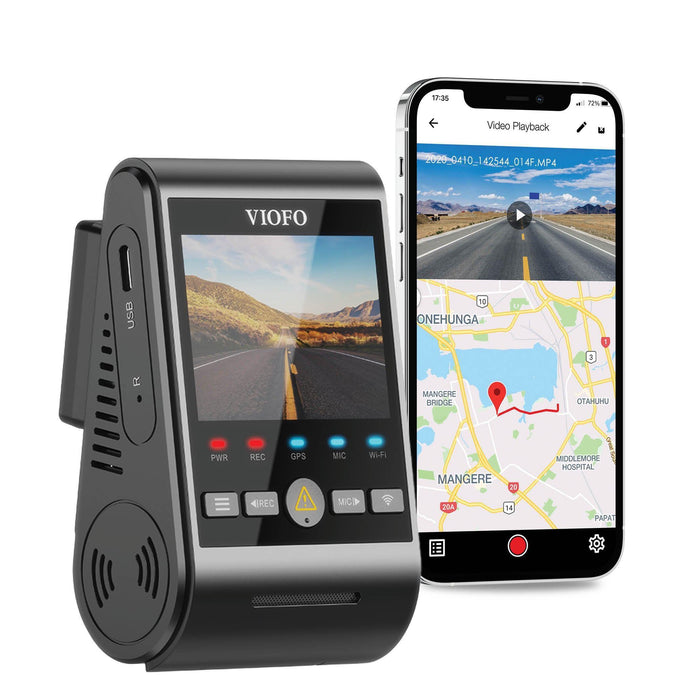
The 2.4-inch display lets you aim the lens and adjust settings directly. Separate PWR, REC, GPS, MIC and Wi-Fi lights show camera status. The screen saver can turn the display off while recording continues.

Spoken notifications report events such as recording changes, protected files and card errors. These are status messages, not voice-command controls. GPS data belongs to saved recordings; it does not provide remote vehicle tracking.

Original VIOFO A229 front camera beside a phone showing local playback and saved GPS data

Local Wi-Fi for reviewing original footage

Connect a nearby phone through the VIOFO app for setup, live view, playback and downloads. Choose 2.4GHz or 5GHz according to your phone and surroundings. VIOFO quotes up to 8MB/s on 5GHz for this model; actual transfer speed varies.

Download important files before the card is reused. The original A229 has no LTE or cloud service for remote viewing. You can also use the included short data cable to copy files to a computer in card-reader mode.

Original A229 Wi-Fi transfer illustration; manufacturer rates up to 8MB/s on 5GHz and actual speed varies

Choose the parking recording mode you need

The optional VIOFO HK4 hardwire kit supplies constant power, an ignition signal and low-voltage protection. Buffered event detection saves 15 seconds before and 30 seconds after detected activity. Time-lapse records at 1, 2, 3, 5 or 10FPS without audio. Low-bitrate mode records continuously with audio at a lower file size.

Runtime depends on the battery, cutoff, temperature and settings. A switched vehicle socket stops powering the camera when it turns off.

Illustration of parked vehicles used to explain A229 event detection

Mounting and reflection control

The supplied static windshield stickers sit between the glass and the adhesive mount, which can make later removal easier. Clean the glass, keep the lens clear of mirror housings and tint edges, and place the camera where the wipers clear its view. Route wiring clear of airbags and moving parts.

The optional CPL-200 filter fits the original A229 front lens. The smaller CPL-100 for A118/A119/A129 cameras does not fit. Align the filter while checking a saved recording to reduce dashboard reflections.

Transparent static windshield sticker between the A229 adhesive mount and glass

Original A229 family review

Our original A229 review demonstrates the camera controls and recording features. It also shows the Duo rear-camera configuration; this listing supplies only the front camera.

Hardwire installation example

This guide demonstrates an A229 hardwire installation in a 2021 Hyundai Kona. Fuse locations and cable routing vary by vehicle. The video includes rear-camera installation steps that do not apply to this front-only package.

What's Included
  • A229 front camera
  • 12V vehicle charger and power cable
  • Type-C data cable
  • GPS mount/logger
  • Windshield static stickers
  • Adhesive mounting stickers
  • Trim removal tool
  • User manual
Original A229 front-only package with camera, GPS mount, charger, data cable, trim tool and mounting stickers
Specifications
Camera Configuration Front only
Front Resolution 2560 × 1440 at 30FPS; 1080p 30FPS also available
Front Image Sensor 5MP Sony STARVIS IMX335
Front Field of View 140° front
Recording Modes Loop recording and G-sensor file protection
Display 2.4-inch LCD
Connectivity Local 2.4GHz / 5GHz
GPS Included GPS mount; saved location, speed and time
Parking Mode Buffered event detection, time-lapse and low bitrate
Storage Support Up to 256GB microSD; FAT32
Included Memory Card Not included
Power USB-C on front camera or GPS mount; Supercapacitor; external power required for recording
Operating Temperature −20°C to 65°C (−4°F to 149°F)
Country of Origin China
Warranty 12 months, backed by BlackboxMyCar
Exposure processing WDR
Voice Spoken status notifications
Parking power Optional HK4 hardwire kit
Microphone / speaker Built in; audio recording can be disabled
Files H.264 / MP4
Front CPL Optional CPL-200; CPL-100 does not fit
Frequently Asked Questions

Is this the A229 Plus, Pro or Ultra?

No. This is the original A229 with a Sony STARVIS IMX335 sensor, 2K 30FPS recording and WDR. Its capabilities and firmware differ from the later A229 Plus, Pro, Ultra and Tele models.

Does this package include a rear camera?

No. It supplies one front camera. Some original A229 family demonstrations show a Duo system, but that rear camera is not included here. If you want a complete front-and-rear setup, compare the A229 Plus 2CH, which uses newer STARVIS 2 sensors and HDR.

Does it support HDR or 60FPS?

This original model offers WDR and records at 2K 30FPS or 1080p 30FPS. For a newer front-only option, the A119 MINI 2 offers HDR at 30FPS or 2K 60FPS with HDR off.

Which memory card should I use?

Choose a high-endurance microSD card up to 256GB. The original A229 manual specifies FAT32; format in the camera and back up important footage first. Larger capacities supported by later A229 generations do not establish support for this model.

What do I need for parking mode?

Add the VIOFO HK4 hardwire kit and install constant power, ignition and ground correctly. Its cutoff helps protect the vehicle battery. The ordinary switched socket does not supply power after it turns off, and the supercapacitor cannot provide extended recording.

How do the parking modes differ?

Buffered event detection stores 15 seconds before and 30 seconds after detected activity. Time-lapse records continuously at a low frame rate without audio. Low-bitrate mode saves continuous video with audio. Each mode covers only the supplied front view.

Can I set a delay before parking mode starts?

Yes. The original manual describes an immediate or 90-second delay with HK4. It notes that this setting does not work with an external battery. Check the selected mode and saved footage after installation.

Can I speak commands to the camera?

No. This model provides spoken status notifications, such as protected-video or memory-card messages. Use its buttons or the nearby-phone app to change settings.

Does 5GHz Wi-Fi let me view the camera away from the car?

No. It is a local link between a nearby phone and the camera. There is no built-in LTE modem or cloud service. GPS records route and speed information for saved footage rather than remotely locating the vehicle.

Why has the screen gone black while the camera is powered?

The screen saver can switch off the display while recording continues. Check the REC indicator and a saved clip instead of assuming the camera has stopped. Review spoken alerts and the memory card if the recording indicator reports a problem.

Is a CPL filter included?

No. Select the CPL-200 filter for the A229/T130/A139-size front lens. The CPL-100 for A118/A119/A129 models is not compatible. Clean the windshield and adjust the filter while checking recorded reflections.

Where can I connect power?

The original A229 has USB-C power connections on the front camera and GPS mount. VIOFO states that GPS works with either power location. Use the supplied vehicle power cable or compatible HK4, and keep the short data cable for computer file access.

How do I copy protected recordings?

Stop recording and power off before removing the card for a reader, or connect the camera to a computer with the short data cable. Protected clips are in DCIM/Movie/RO; parking files are in DCIM/Movie/Parking. Copy original files to another device before formatting.

Which firmware should I install?

Use firmware confirmed for the original A229, and check the installed version in the camera menu. Do not substitute A229 Plus, Pro, Ultra or Tele files. If the original model is absent from the current download selector, contact VIOFO support with the model and version before updating. Keep power stable throughout an update.

What warranty comes with this unit?

This package includes a 12-month BlackboxMyCar warranty. See our warranty and returns terms for coverage and the claim process. The warranty for a new model does not replace this listing’s terms.

What condition is this unit in?

BlackboxMyCar Outlet products are tested, like new and backed by our in-house 10-point check. Our normal return policy applies. Check the selected refurbished listing’s condition before ordering.

What should I know about this package before ordering?

No memory card, CPL filter, hardwire kit, rear camera or cabin camera is included. Select these separately if needed for your installation.

Resources

The original A229 manual and review cover both front-only and Duo operation. Rear-camera sections apply only when that hardware is fitted.

Guides & Reviews