


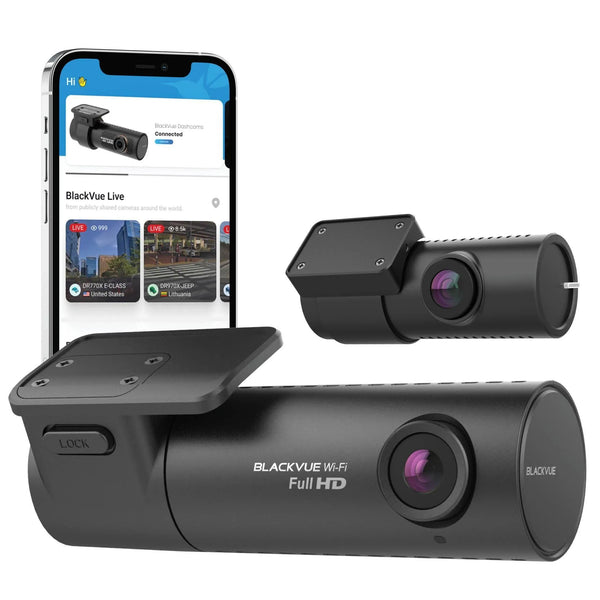





How to Install a Rear Dash Camera
How to install a rear dash camera on an SUV, hatchback, crossover, or any vehicle with a liftgate.
Installing a rear camera for SUV/hatchback
Many people want to know how to install 2-channel dash cams on a car with a rear liftgate, such as a hatchback, crossover, or SUV. While it is more complicated than a standard sedan, installation is still possible with a few extra steps.
For us, purchasing a multi-channel dash cam, especially one with a rear camera, is highly recommended. A rear dash cam records what is going on behind you, whether you are driving or parked, which is ideal for full coverage and peace of mind.
This page covers the front and rear installation process for SUVs and any vehicle with a rear window that moves with the trunk or liftgate. For details on hardwiring the front camera, check out our Dash Cam Hardwiring Guide.
Find out how to install a 2-channel dash cam into an SUV or hatchback. Contact our product experts if you have any other questions.
Rear dash cam installation in a vehicle with a liftgate
The rear dash cam installation in a vehicle with a liftgate, such as a hatchback, crossover, or SUV, is different from installing in most sedans and coupes because the rear window where the rear dash camera is attached moves. This means a traditional rear camera installation on the rear window needs enough slack when the liftgate is fully opened.
While some drivers are fine with wires dangling between the headliner and the liftgate, we recommend going through the rubber hoses between the chassis and the liftgate because it looks cleaner and more professional. These hoses usually connect the rear windshield wiring to the main vehicle body at the top when the liftgate is raised. If there is trim on the liftgate, you can remove it to hide the rear camera cable underneath.
Things you'll need
Similar to a front dash cam installation, installing a rear dash camera on your hatchback or SUV requires the following materials:
- Rear dash camera
- Rear camera cable
- Adhesive mount
- Cable clips
- Microfibre towels
- Glass cleaner
- Trim tool


Route the cables
Connect the cable from the front dash cam and power source. If you purchased a 2-channel dash camera from us, it will come with a rear camera cable.
Next, connect the rear camera cable to the front camera. The wire will be routed along the headliner, then past the A, B, and C pillars.
Wait, what are these pillars?
Pillars are the vertical supports on a car, lettered from A to D from front to rear. The frontmost pillar is the A-pillar, which helps support the windshield. The B-pillar sits behind the A-pillar and divides the front and back seats. The area behind the rear seats is around the C-pillar. D-pillars are typical in larger vehicles like trucks and vans.
For hatchbacks and SUVs, you will usually pass the cable through the A, B, and C pillar areas.


Wiring to the hatchback
Routing wires from the front to the rear of a car can be tricky. To avoid a messy install, thread the cable through the rubber hoses connecting to the liftgate. First, check which hose has more room by gently squeezing them. If there is enough space, you may be able to push the wire through by hand.
For tighter hoses, use a rigid thin wire, coat hanger, fishing wire, or long zip tie to guide the cable through. Attach the camera cable to your guide wire with electrical tape, fully covering the tip to protect the cable pins.
Pull the required length of wire through, then hide it behind the trim, making sure all plastic clips are properly aligned. Reattach the rubber tubing securely so it remains waterproof.
Some cameras have different plugs for the front and rear. For example, rear plugs may have straight tips, which are easier to thread through hoses. Make sure you are using the correct end of the cable for installation.
Clean the rear window
Make sure the windows are clean before mounting the camera. We recommend using a professional glass cleaner and installing BlackboxMyCar Aqua Shield to help keep your dash cam footage clearer in rain and harsh weather.
Aside from ensuring clear vision, a clean rear windshield also helps create a strong adhesive bond when mounting the rear dash cam.
Mount the rear dash camera
Now it is time to mount the rear dash cam. Every package comes with an adhesive mount that attaches to the rear windshield. We recommend attaching it at the centre of the rear windshield while avoiding the rear defroster grid lines where possible.
Make sure to mount the camera in a location where it will not move and where the cable has enough slack for the liftgate to open and close. For best results, check the live view from your rear dash cam in the smartphone app to confirm the camera angle is wide enough and is not blocked by defroster lines. We recommend mounting near the top centre of the rear windshield unless the view is obstructed.
Alternatively, you can install the rear dash camera near the rear roof area instead of directly on the window. This is especially useful for rear windows that can be lifted independently from the main trunk hatch. The basic headliner fabric in your vehicle is not suitable for standard adhesives, so you will need a stable platform or mounting method.
Another more professional alternative is to use a magnetic coin mount.


Test the rear dash camera
After mounting and wiring, test the rear dash cam to make sure it is working properly. Turn on the vehicle and check if the dash cam powers on automatically. If it does not turn on, check the power connections and make sure the dash cam is properly mounted.
Clean it up
Finally, now that the cameras are installed, clean up the wires. Use electrical tape or cable clips to keep cables bundled in the headliner, tuck everything away, and put the trim covers back. Make sure there are no kinks or rough corners in the cable path, because those can cause problems later.
That is how you install a rear dash camera on a vehicle with a liftgate. If you have other questions, feel free to contact our product experts and we will be happy to help.
For more dash cam installation guides, visit our Dash Cam Installation Guide.
Helpful install accessories

BlackboxMyCar Aqua Shield
Helps keep the rear glass cleaner in wet weather so your rear camera has a clearer view.
Shop Now
Essential Install Package
Useful trim tools and install basics for cleaner cable routing through the cabin and hatch area.
Shop Now
Microfibre Towel
Good for cleaning glass and prep areas before applying the rear camera adhesive mount.
Shop NowRear camera install FAQ
Can you install a rear dash cam on an SUV or hatchback?
Yes. SUVs, hatchbacks, and crossovers can use a rear dash cam, but the cable routing takes more care because the rear window moves with the liftgate.
Where should a rear dash cam be mounted on a hatchback?
Mount it near the top centre of the rear windshield when possible, while avoiding view obstruction and checking that defroster lines do not block the camera view.
Should the rear camera cable go through the liftgate hose?
Yes, that is the cleaner professional route when there is enough space. It hides the cable and helps avoid a dangling wire between the headliner and liftgate.
How much cable slack does a hatchback rear camera need?
It needs enough slack for the liftgate to open fully without pulling on the rear camera cable. Test the liftgate movement before snapping trim panels back in place.