Skip to content
SKU BV-Elite9-2

BlackVue Elite 9 2CH 4K UHD Sony STARVIS 2 Dash Cam

Availability:
Low stock
Save 9% Save 9%
Original price $570.99
Original price $570.99 - Original price $570.99
Original price $570.99
Current price $518.99
$518.99 - $518.99
Current price $518.99
Best Price Guaranteed
Every order includes:

Chat with an expert

Talk to a dash cam expert before you order.

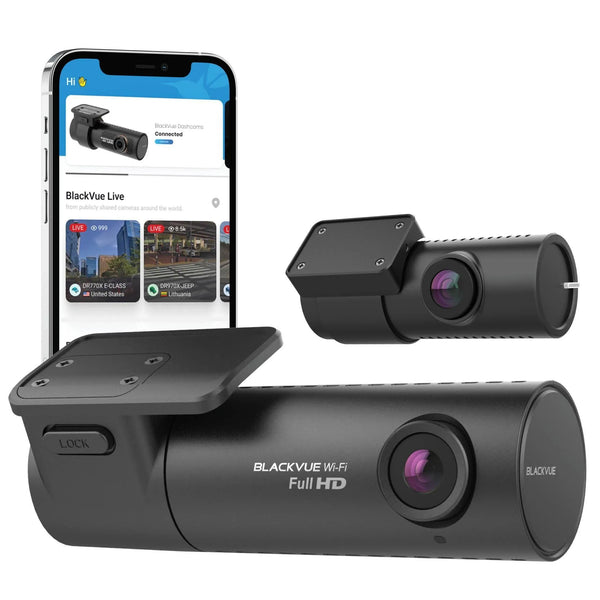
BlackVue ELITE 9-2CH: 4K Front and 2K Rear with Dual HDR

The BlackVue ELITE 9-2CH records 4K UHD at 30FPS in front and 2K QHD at 30FPS behind you. Sony STARVIS 2 sensors and HDR work on both cameras, helping balance bright headlights, shadows and changing daylight.

Built-in GPS records location data, and dual-band Wi-Fi lets you view and download clips nearby. The package includes a microSD card and both hardwire and USB-C power options. This new BlackVue dash cam carries a two-year warranty.

4K + 2K HDR

Sony STARVIS 2

Power Saving

Built-in GPS

Cloud Ready

HDR for the road ahead and the view behind

The front camera uses a Sony STARVIS 2 IMX678 sensor and a 146° diagonal lens. The rear uses an IMX675 sensor with a 142° diagonal view. Both record at 30FPS with HDR, which balances exposure when a scene includes bright and dark areas.

Watch the original BlackVue ELITE 9 daylight sample to judge the front view. Lighting, motion, distance and mounting still affect readable detail. Online compression can hide detail, so check original files after installing your cameras.

If rear resolution matters more than rear HDR, compare the ELITE 10 with 4K front and rear recording. Its front camera supports HDR; its rear camera does not.

Save power while waiting for a parked impact

Power Saving mode puts the camera into standby until it detects an impact. BlackVue specifies less than 1mA at 12V while waiting, with recording beginning within about two seconds after detection. This mode does not save a pre-impact buffer.

Recording and connected accessories use more power than standby. Available battery capacity, event frequency, cutoff settings and temperature determine how long the camera can stay parked and powered. There is no fixed number of days for every installation.

Use the included hardwiring cable, or choose a compatible BlackVue B-130A battery pack installation to power the camera separately from the vehicle battery.

BlackVue ELITE 9 front and rear cameras shown in hand

Keep earlier activity with buffered recording

Motion Detection mode continuously buffers video and saves activity when motion or an impact triggers recording. Supported buffered events include ten seconds before the trigger, so you can review what led up to the incident.

Time Lapse captures one frame per second and plays the scene back faster. These continuously running modes use more power than impact-only standby. Choose a mode based on the footage you need, then set the parking timer and voltage cutoff for your vehicle.

GPS and the G-sensor also support driving-event tags for impacts, hard braking, acceleration, cornering and overspeed. Adjust sensitivity if normal road bumps produce too many event files.

BlackVue ELITE 9 front camera housing and connection controls

Download nearby or connect remotely

Connect your phone over 2.4 or 5GHz Wi-Fi to review clips, change settings and download recordings. Bluetooth assists pairing. Built-in GPS and GLONASS supply location information without a separate GPS antenna.

For remote live view, alerts and uploads, the camera needs internet through a compatible hotspot or the optional BlackVue CM100G LTE module. The ELITE 9 has no built-in cellular modem. Match the module and SIM to your regional carrier; hardware, data and any paid Cloud plan are separate.

Remote features depend on power, connectivity and settings. Power Saving sleeps between impacts, so use an appropriate continuously powered mode when ongoing remote access matters.

BlackVue ELITE 9 camera pair ready for installation

Choose recording quality and keep important files

The ELITE 9 supports H.265 and H.264 MP4 recording and compatible BlackVue microSD cards up to 1TB. The highest H.265 setting uses 60Mbps in front and 25Mbps at the rear. The default High setting uses 30 + 20Mbps.

For a capacity comparison, BlackVue estimates 2 hours 25 minutes on a 64GB card or 41 hours 15 minutes on 1TB at High quality. These are reference capacities, not a statement of the card size supplied with this kit. Higher bitrates retain less footage.

Loop recording replaces older files. You can protect up to 50 event files from normal overwrite, but formatting erases them. Export important clips to a separate device and review our dash cam memory-card options for compatible replacements.

ELITE dash cam mounted near the mirror in a nighttime city scene

Mount both cameras and select the right power cable

Mount the front camera near the mirror and the rear camera on clean rear-window glass. Rotate each camera to aim its view, route the connection cable safely and review a saved clip from both cameras before securing the cable. The touch sensor can start a manual recording when enabled.

The included USB-C power cable and vehicle adapter provide driving power. BlackVue specifies that this connection does not support parking mode. For recording with the engine off, use the included hardwiring cable or a compatible battery setup. See our installation guides for planning.

The operating range is −20°C to 65°C. Thermal protection can stop recording at excessive temperatures; it does not guarantee continuous recording in a hot parked vehicle. For dashboard reflections, the optional BlackVue CPL-2 front filter is compatible and sold separately.

BlackVue ELITE touch recording sensor on the front camera
What's Included
  • Front camera and mount
  • Rear camera and mount
  • Rear-camera connection cable
  • Hardwiring power cable
  • USB-C power cable
  • USB-C 12V vehicle adapter
  • MicroSD card
  • Double-sided mounting tape
  • Pry tool / trim remover
  • Five cable clips
  • Alcohol pad
ELITE 9 package contents, including both cameras, card and power cables
Specifications
Camera Configuration Front and rear
Front Resolution 3840 × 2160 at 30FPS with HDR
Rear Resolution 2560 × 1440 at 30FPS with HDR
Front Image Sensor Sony STARVIS 2 IMX678
Rear Image Sensor Sony STARVIS 2 IMX675
Front Field of View 146°
Rear Field of View 142° diagonal
Recording Modes Loop recording; older recordings are overwritten
Display No built-in screen
Connectivity Dual-band 2.4/5GHz, IEEE 802.11 a/b/g/n/ac
GPS Built-in GPS / GLONASS
Parking Mode Power Saving, Motion Detection and Time Lapse
Storage Support Compatible BlackVue microSD up to 1TB
Included Memory Card MicroSD card included
Power DC 12 to 24V through the specified power cable; Supercapacitor; not a parking battery
Operating Temperature −20°C to 65°C (−4°F to 149°F)
Dimensions Front: 129.7mm wide × 55.3mm high; 203.2g; rear: 29mm wide × 39.1mm high; 38.8g
Warranty 2-year manufacturer warranty
Video format MP4 using H.265 / HEVC or H.264 / AVC
Maximum bitrate H.265: front 60Mbps + rear 25Mbps
Default quality High: front 30Mbps + rear 20Mbps
Bluetooth Built-in; supports app pairing
LTE connection External CM100G module optional; not built in
Standby power Below 1mA / 12mW at 12V in Power Saving
Impact wake-up Within about 2 seconds; Power Saving has no pre-buffer
Buffered events 10-second pre-event recording in supported buffered modes
Parking timer Configurable from 1 to 48 hours
Voltage protection Configurable cutoff; select settings for your vehicle
Event protection Up to 50 event files; formatting erases all files
Controls Power button and touch recording sensor
Audio Built-in microphone and speaker
Storage range −20°C to 80°C (−4°F to 176°F)
Rear dimensions 29mm wide × 39.1mm high; 38.8g
Frequently Asked Questions

What resolution does each camera record?

The front records 4K UHD at 30FPS and the rear records 2K QHD at 30FPS. Both use Sony STARVIS 2 sensors and support HDR.

How is the ELITE 9 different from the ELITE 10?

The ELITE 9 combines 4K front and 2K rear recording with HDR on both cameras. The ELITE 10 records 4K at both ends, with HDR on the front camera only.

Does this kit record inside the cabin?

No. It includes a front camera and a rear-window camera. Neither is a dedicated interior camera.

Is the hardwiring cable included?

Yes. This BlackboxMyCar kit includes a hardwiring cable, USB-C power cable and vehicle adapter. Fuse connections depend on your vehicle.

Can USB-C power support parking mode?

No. The BlackVue manual specifies driving power only through this connection. Use the included hardwiring cable or a compatible battery installation for parking recording.

Does Power Saving record before an impact?

No. It sleeps until an impact is detected and begins recording within about two seconds. For earlier activity, choose a mode with buffered recording.

What does the below-1mA figure describe?

It is standby consumption at 12V in Power Saving mode. Recording, wake-ups and connected accessories consume additional power.

How long does parking mode last?

Runtime depends on the available battery capacity, power source, recording mode, detected events, temperature and cutoff settings. A fixed number of days does not apply to every installation.

What is the difference between Motion Detection and Time Lapse?

Motion Detection buffers video and saves triggered activity. Time Lapse records one frame per second for a faster overview. Both remain active and use more power than impact-only standby.

Does it have built-in LTE?

No. Remote connectivity requires a compatible Wi-Fi hotspot or a separate CM100G LTE module with a supported SIM and data plan.

Can I use the app without a cellular plan?

Yes. Nearby Wi-Fi access supports settings, playback and downloads without cellular service. Remote Cloud features need internet at the camera and the relevant BlackVue service plan.

What memory-card capacity does it support?

It supports compatible BlackVue microSD cards up to 1TB. A microSD card is included in this kit; the maximum supported capacity is not a claim about the supplied card size.

How much recording history can a card hold?

At the default High setting, BlackVue estimates 2 hours 25 minutes on 64GB or 41 hours 15 minutes on 1TB for both cameras combined. These are examples; actual retention depends on quality settings and recording activity.

Does protecting an event file make it permanent?

No. Up to 50 event files can be protected from normal overwrite, but formatting deletes them. Download important recordings and keep a separate backup.

Can it keep recording in a hot parked vehicle?

Recording can stop when thermal protection activates. The specified operating range is −20°C to 65°C. Keep the installation within manufacturer guidance and allow the camera to cool if it shuts down.

What warranty does this new dash cam include?

This new BlackVue dash cam has a two-year warranty. Refurbished dash cams follow the separate 12-month policy.

The LTE module, SIM/data plan, CPL filter and battery pack are sold separately.

Resources
J
John

Does Blackvue have any compatibility with external waterproof camera?

BlackboxMyCar

None of the BlackVue models we carry are compatible with such a camera.

W
Where d.t.L.m.p.

Where is the LTE module placed?

BlackboxMyCar

It is usually placed in an upper corner of the windshield, adjacent to the front camera.

Loading add-ons...