
Skip to content
Installing a BlackVue Elite 9 2CH Dash Cam into a 2026 BMW M5 Touring

Installing a BlackVue Elite 9 2CH Dash Cam into a 2026 BMW M5 Touring

It’s been a very long time since BlackboxMyCar has had the chance to work on a BMW M5, so we were very excited when this brand-new 2026 M5 Touring rolled into our install bay with less than 200 km (125 miles) on the clock!

Codenamed G99, this is the first M5 generation to officially be offered with a wagon body style in North America, competing with the venerable Audi RS 6 Avant, and filling a gap left by the discontinued Mercedes-AMG E 63 Estate and Porsche Panamera Sport Turismo. In addition to being a new option for auto enthusiasts seeking a more practical alternative to sports sedans without sacrificing their driving dynamics, it’s also the second vehicle of its kind to combine the ubiquitous twin-turbo V8 with a plug-in hybrid system, working together to produce a class-leading 717 horsepower, beating a record previously set by Porsche.

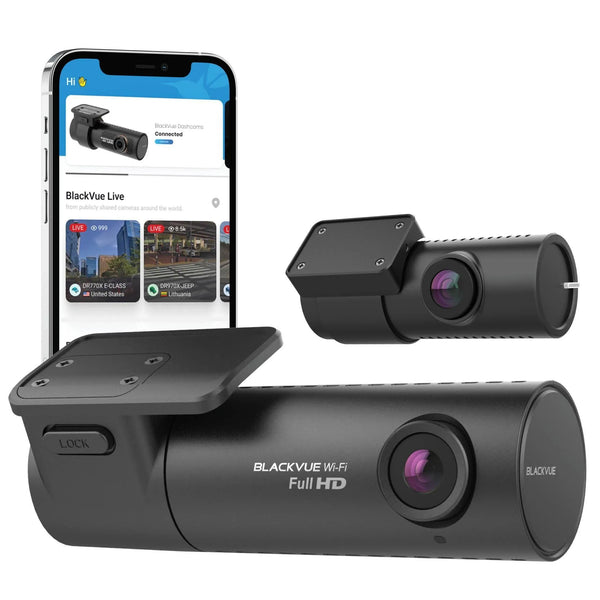
It's only fitting that we outfit it with one of our most advanced systems, the BlackVue Elite 9 2CH, with front 4K and rear 2K Sony STARVIS 2 sensors, dual HDR, up to 1TB of microSD card storage, and compatibility with BlackVue’s Cloud service. Because the M5 Touring is both a BMW and a hybrid, the owner also opted to get a PowerCell 8 battery pack to ensure there are no issues with the M5’s small 12V battery and finicky electrical system.

This guide will be applicable to many newer BMWs and will cover many of the common complications that come with installing into a BMW, along with other European and hybrid vehicles. For more advice on wiring a dash cam into a BMW or a hybrid vehicle, check out our BMW-specific installation guide and hybrid-specific installation guide.

Step 1: Hardwiring with a Battery Pack

The first step of any dash cam installation is to locate the fuse box, where the system will be hardwired. Like many BMWs, the new M5 Touring has multiple fuse boxes, including one in the passenger side footwell and one in the rear cargo area. We ended up using the one in the rear cargo area, which is tucked behind an access panel on the passenger side.

Now that we’re at the fuse box, we’ll need to look out for delayed ACC fuses. These are fuses that continue to operate for approximately 15 minutes after the vehicle is turned off, and can easily be confused with constant fuses that always operate. This will present more of an issue for a standard dash cam connection, but since we’re wiring a battery pack, we only need to wire to a single ACC connection rated between 20A and 30A.

To identify delayed ACC fuses, use a circuit tester to test the fuse you intend to use, both when you turn off the vehicle and 15 minutes after the vehicle has been left off, with access to the fusebox left open. Small actions such as opening the door, turning on the headlights, or bringing the key card near the car can trigger delayed ACC fuses to come on again, meaning you’ll need to wait all over again.

Once a suitable ACC fuse is found, we’ll use an add-a-fuse included with the PowerCell 8 to piggyback its included hardwire kit’s power wire off the fuse, and secure the ground wire to a suitable bare metal point nearby. For more advice on hardwiring a dash cam or battery pack, check out our hardwiring guide here

Next, we’ll mount the battery pack. The 2026 M5 Touring has a small storage compartment for its emergency tools, accessible by lifting the rear edge of the cargo floor, with an empty space that happens to be the perfect size for the PowerCell 8. Using the two included velcro strips, we secured it to the carpeted surface, then ran the hardwire kit from the fuse box, underneath the upper carpeting and into this space, and plugged it into the battery pack.

Since we’re connecting a BlackVue Elite dash cam to this battery pack, we’ll use an unspliced output cable to connect to the dash cam’s included hardwire kit. We ran this cable up and under the upper carpeting, in the opposite direction of the battery pack’s hardwire kit, and fished it up through the fuse box opening. We finished by splicing it together with the BlackVue hardwire kit, matching up the ACC, constant, and ground wires.

Step 2: Dash Cam Placement and Mounting

The next step is deciding where to mount the cameras. For the M5 Touring, we decided to place the front camera on the passenger side, next to the rearview mirror stem; this way, the camera is hidden from the driver by the rearview mirror, while appearing discreet to onlookers from the outside.

Ensure to temporarily power the camera on with the included USB-C power cable, and check its live-view to ensure the best viewing angle since the BlackVue is screenless. This is done through the BlackVue App, which can seamlessly connect to your phone in seconds. Once the right spot has been decided, wipe down the area with a suitable automotive windshield cleaner, both the outside and inside, to ensure that the view is unobstructed and the adhesive sticks well.

To mount the camera, simply peel off the adhesive backing and firmly hold it in place for a few moments until it adheres properly. The same steps can be repeated for the rear camera. Since the new M5 Touring has a fixed rear window, we mounted it centred at the top, ensuring that it stayed clear of the defroster lines, while keeping the lens within the rear wiper’s sweep range.

With the easy part done, wiring the cameras comes next.

Step 3: Wiring the Front and Rear Cameras

As the G99 M5 Touring is a newer BMW model, it has a couple of unique quirks that have slowly become more prevalent in BMWs over the last 5 years. The first being the weather stripping around each door opening on the body, which is held in place by the headliner, making it impossible for us to run the cables along the outer edges of the car’s roofline as usual, and thus complicating the installation. The other being how wires are run from the body into the rear hatch, following the hatch hinges instead of going through dedicated rubber grommets—this actually makes wiring the rear camera easier, which you’ll see later.

To effectively wire from the battery pack to the front camera, there are a couple of approaches you can take. One is to drop the headliner, but that takes too much time and effort, so we opted for the second method of carefully pulling the hardwire kit along the roof, above the headliner, with a special tool instead. It’s extremely important to be familiar with your vehicle and take extra care when doing this, as you could damage the headliner or anything hidden above it if you’re not careful. With 14 years of collective experience under our belts, including with exotic vehicles, this was no challenge for us, but you may want to seek a professional installation if you’re not confident enough in your DIY skills.

We chose to run all the wiring on the passenger side of the car, as that’s where the fuse box, battery pack, and front camera are all located. Before we can do this, however, we have to remove the plastic trim on the passenger side D-pillar first. This piece is quite challenging to remove as it’s held in place by several metal and plastic clips, with some in awkward locations, so extra caution must be taken to avoid breaking the piece or any clips.

From here, it’s all a matter of attaching the end of the BlackVue hardwire kit to the wire puller and using it to pull the cable up the D-pillar, into the headliner, and through to the windshield, working carefully and slowly, steering clear of the side curtain airbags. Once we reach the front, it’s a simple matter of pulling out enough slack to run the hardwire kit across the front edge of the headliner and down into the front camera, where it plugs in.

Now that the front camera is wired up, we can repeat this process the other way around for the rear camera, after connecting it to the front camera first. Once we’re at the rear of the car, we will have to do some more disassembly to ensure the high-speed coaxial cable can enter the rear hatch and reach the rear camera. First, remove the passenger side hatch hinge cover by undoing the two Torx screws on the side, then remove the large plastic trim panel at the top of the hatch to clear a path for the cable. All that’s left to do here is to pull the wire up the D-pillar, through the hatch hinge opening, up into the hatch, and onwards to the rear camera.

Step 4: Finishing Touches

Before hitting the road, test the system to make sure it's working properly. Turn on the car and check if the battery pack starts charging, and if the dash cam turns on automatically. If it doesn't, check the connections to make sure nothing has come loose. Then, turn off the car and make sure the battery pack stops charging, and that the dash cam goes into parking mode. If it doesn’t, ensure you wait for the ACC power to switch off, and also ensure that both parking mode and battery protection are enabled using the BlackVue app. You’ll also want to do one final check of the live-view just to ensure that the viewing angles are optimal.

Finally, now that our cameras and battery pack are installed and wired up, let's clean up the wires and reinstall any parts that were removed. You can use electrical tape, zip ties or cable clips to organize the cables and hide any excess cabling where there’s space behind the panels. For the rear camera cable specifically, we used zip ties to secure it along the factory harness running along the hatch hinge, ensuring that it doesn’t interfere with the opening or closing of the hatch.

And We’re Done!

And there we have it, a BlackVue Elite 9 dual-channel dash cam and PowerCell 8 battery pack installed in a 2026 BMW M5 Touring. From the outside, looking in through the front of the vehicle, the Elite 9 blends in well with the car. The rear camera is also very sleek and compact, small enough not to interfere with your visibility out the rear of the vehicle, and from the outside, looking in, it's virtually invisible.

Combine that with the PowerCell 8, and you’ll not only avoid any of the issues that you may encounter when directly hardwiring a dash cam into a BMW or a hybrid, but you’ll also be able to get nearly two weeks of parking mode protection thanks to BlackVue’s new Power Saving parking mode.

The installation took about 3 hours, including routing the cables, wiring everything up, and checking the front and back cameras using the mobile app viewer.

Hardwire dash cam installation guide

Planning on installing a dash cam in your BMW M5 Touring or a different car? Check out our Step-by-Step Dash Cam Installation Guide and our selection of handy installation accessories. And if you ever need a hand during the installation process, just contact us; our dash cam specialists are available to help!

Looking to have your dash cam professionally installed? We do offer installation services at our Richmond, BC location, and we also have a list of trusted installers across Canada and the U.S. Book here

Please also check out some of our other dash cam installations in the BlackboxMyCar Dash Cam Installation Gallery.

✓ True 4K + 2K dual-channel clarity. Front camera records in crisp 4K UHD HDR using an 8 MP Sony STARVIS 2 sensor, while the rear camera captures in sharp 2K QHD HDR with a 5 MP STARVIS 2 sensor, so plates, faces, and road details are clear from both ends of your vehicle in all lighting conditions.

✓ Next‑generation Sony STARVIS 2 image sensors. Both front and rear cameras use Sony STARVIS 2 with HDR to deliver a significantly wider dynamic range than previous STARVIS models, preserving detail in bright highlights and dark shadows where ordinary 4K dash cams blow out skies or lose detail at night.

✓ HDR optimized for day and night. Hardware HDR on both channels reduces glare, haloing, and headlight bloom so you can rely on readable footage in tricky conditions like tunnels, underground lots, and rainy nights, instead of washed‑out or grainy video.

✓ Advanced parking surveillance with power‑saving mode. Dedicated parking features automatically monitor your vehicle when the ignition is off, with motion/impact detection and an efficient power‑saving mode that keeps watching over your car for extended periods when hardwired, without excessively draining your battery.

✓ Supercapacitor and high‑heat durability. Built with a supercapacitor instead of a lithium battery, the BlackVue Elite 9 is engineered for reliability in hot interiors and cold winters, providing long‑term stability and safer operation than battery‑based dash cams in extreme temperatures.


Sold out
Next article The Ultimate Gift of Protection: Why a Dash Cam is the Superior Valentine’s Day Choice for 2026