
Ir a contenido
Installing a BlackVue Elite 8 2CH in a a 2023 Nissan Kicks Without a Single Wire Hardwired

Installing a BlackVue Elite 8 2CH in a a 2023 Nissan Kicks Without a Single Wire Hardwired

Today, we're going to walk you through the process of installing the BlackVue Elite 8 2-channel dash cam into a 2023 Nissan Kicks using the cigarette lighter adapter included with the unit.

If you don’t want to tinker with the car’s fuse panel and you don’t need parking mode either, the cigarette lighter adapter (CLA) is the easiest and most convenient solution for powering your dash cam, as virtually all dash cams come standard with one in the box.

However, as you’ll soon find out, even CLA installations come with a catch, as not every cigarette lighter functions equally. Fortunately, it didn’t end up being an issue with this one.

Step 1: Unboxing and Preparation

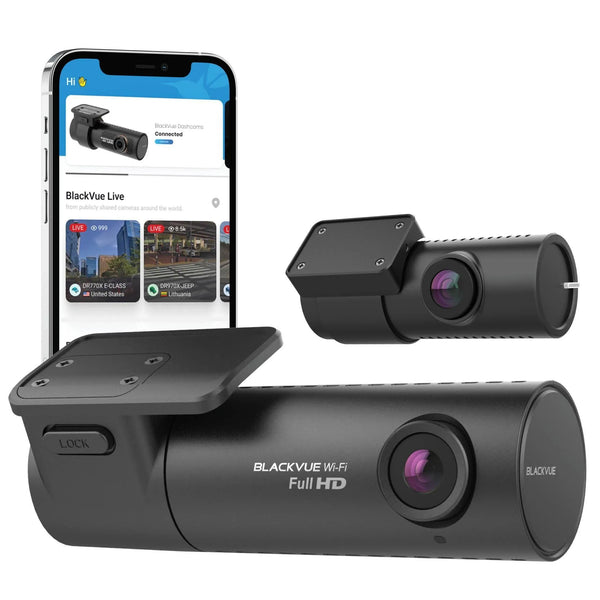
Start by unboxing your BlackVue Elite 8 dash cam. Inside the box, you'll find the main camera unit, rear camera, mounting brackets, high-speed coaxial rear camera cable, USB-C power cable, cigarette lighter adapter, and 64GB microSD card. The Elite 8 serves as the entry point into BlackVue’s new Elite series, featuring dual Sony STARVIS 2 IMX675 sensors recording at 2K with HDR. Unlike the rest of the Elite series, a hardwiring kit is not included, but it still packs all of the new and improved features the Elite series is known for, like a physical power button, power-saving parking mode, and support for up to 1TB of storage.

Step 2: Positioning the Dash Cam

The first step is to decide where you want to install your dash cam. The ideal location for the front camera in this Kicks is behind the rearview mirror, with the lens centred on the windshield. This placement allows for a clear view of the road ahead without obstructing your view while driving.

Ensure to check the camera’s live-view to ensure the best viewing angle since the BlackVue is screenless. This is done through the BlackVue App, which can seamlessly connect to your phone in seconds.

Step 3: Mounting the Dash Cam

Once you've decided on the position, clean the windshield area with windshield cleaner and a microfiber cloth to ensure a secure mount. Peel off the adhesive backing from the mounting bracket and press it firmly onto the windshield for 30 seconds.

Step 4: Installing the Rear Camera

For the rear camera, clean the rear window area where you plan to mount it. Attach the rear camera in the same way as the main unit.

Same as the front camera, you’ll want to check the live-view of the rear camera before mounting it. You’ll want to specifically make sure that there aren’t any defroster lines blocking the dash cam’s vision.

Step 5: Connecting the Cigarette Lighter Adapter

Now, it's time to connect the CLA and USB-C power cable. Locate the cigarette lighter socket, which is right underneath the air conditioning controls in this case, and plug the CLA into it. Then, plug the USB-C power cable into the port marked “Dashcam”. Aaaand, that’s it for this step! CLAs are just that simple to wire to power, as they are a simple plug-and-play connection.

One thing that caught us off guard about this Nissan Kicks was that the cigarette lighter socket remains powered for a few minutes after the car is turned off, and will also power up every time the doors are locked, unlocked, opened, or closed. While this is somewhat uncommon for Asian vehicles, being more commonplace among American and European vehicles, we were relieved that the socket always ends up powering down after a few minutes, preventing the dash cam from remaining on and draining the car’s battery.

Step 6: Routing the Cables

Route the USB-C cable from the CLA to the front camera, tucking it beneath the passenger side of the dashboard and up into the car's headliner and trim to keep it out of sight. For this installation, we ran it up the A-pillar of the vehicle, removing the trim to wire behind the airbag, ensuring it isn’t obstructed in the event of an accident.

Do the same for the high-speed coaxial cable connecting the main and rear cameras. To connect these, we ran the rear camera cable along the passenger side of the roof of the vehicle, past the A, B, C and D pillars. Using a Trim Tool or other device to get in there can prove helpful.

Since the Nissan Kicks has a rear liftgate, wiring the rear camera is a bit difficult. You’ll need to fish the rear camera through one of the rubber grommets running between the vehicle’s body and liftgate, pulling the cable out on the other side.

Step 7: Testing the System

Finally, start your vehicle to power the dash cam and check if both cameras are working properly. Redjust the camera angles if necessary. And there you have it, a BlackVue Elite 8 2-channel dash cam installed in a 2023 Nissan Kicks. The installation took under 2 hours, including routing the cables and checking the front and back cameras using the mobile app viewer.

If you need assistance with installing a dash cam in your Nissan Kicks or any other vehicle, don’t hesitate to reach out to our support team. We’re always ready to help.

If you’re in the Vancouver, Canada area and need help from our professional installers, give us a call to schedule an appointment or book directly here.

4K Front + 2K Rear Recording – Crystal-clear footage front and back that actually captures the details you need (license plates, road signs, the color of that car that cut you off)

Smart Parking Mode – Motion and impact detection that monitors your car when you're not there, without draining your battery or filling your SD card with useless footage

Dual-Band WiFi – Lightning-fast footage transfers to your phone with 5GHz connectivity, so you're not standing in a parking lot for 10 minutes waiting for a clip to download

Built-In GPS + WiFi – Track your routes automatically and review footage right from your phone without pulling the SD card or connecting cables

Sold out
Artículo siguiente Installing a VIOFO A229 Plus Duo in a 2023 Dodge Challenger Scat Pack (When the Fuse Box Is in the Trunk)