TLDR: A good dash cam maintenance routine includes cleaning the lenses and glass, checking saved footage, formatting or replacing the microSD card, confirming the date and time, updating firmware from the manufacturer, and testing driving and parking recordings. Run this check every few months and before a long trip.
So you will be ready for all the spring adventures ahead
Ahhh...Spring! The weather is getting better all around and winter driving may finally be behind us. But just as you may be thinking the roads are finally safe again you may not realize that spring brings a whole new road of hazards that you need to pay attention to, from potholes, rain showers and sun glare to pedestrians, cyclists, and animals.
And just like how you need your dash cam to be reliable during the winter, you need it to be in tip top shape in spring as well. We are often contacted by people wondering why their dash cam is misbehaving. So, to help you get your dash cam ready for all the spring adventures ahead, we’ve put together some top tips for you. Got a motorcycle dash cam? These tips work for you, too!
Lens, Windshield & Wipers
You may have centered your dash cam and made sure it captures the right angles, but if the camera lens or the windshield is dirty, you will be left with nothing but blurry, smudgy footage.
Dash Camera Lens
While it isn’t hazardous, a dirty camera lens certainly makes it challenging to record clear images. Even in perfect daytime conditions, dirt and scratches can cause loss of contrast.
For best video recording results, ie. no “blurry” and “foggy” videos or excessive sun glare, you should clean the camera lens regularly.
If you live in a dusty environment, it’s a good idea to first remove the dust from the lens using a soft brush. Wiping the lens with dust still on it could lead to scratches.
Wipe the lens with a non-scratch lens cloth, optionally dampened with isopropyl alcohol.
Make sure to allow the lens to air dry.
You can also reduce glare on your dash cam by using a CPL filter. Make sure to rotate the filter after installation to get the angle just right.
Clean Your Windshield
Not getting crystal clean video quality? A dirty windshield could be the problem, especially for those who drove on heavily salted roads. Salt stains can quickly collect on car windshields during winter, leaving a white and gray film.
You can use your wipers, but a common problem with many vehicles is that the windshield wipers do not cover the entirety of the windshield, ie. the upper portion. This is especially true for older Honda Civics. While it’s always a good idea to have the camera in an area that the wipers will reach, sometimes it’s easier said than done.
When cleaning your windshield, stick with a non-ammonia based cleaner to avoid leaving an invisible film that can refract light. In other words, avoid cheap Windex, etc. You can try a 50-50 solution of water and white vinegar.
Don’t Forget the Wiper Blades
Blades are easy to overlook - until you need them to see through rain and muddy road spray from other cars. Clean the blades with a paper towel or cloth soaked in windshield washer fluid (or a mild detergent). And don’t forget about the rear windshield wipers, too, if you have them.
MicroSD Cards
One of the main reasons for a dash cam to falter is because the SD card has not been regularly formatted and/or the microSD card has not been changed when it is worn out (ie. unable to store data any longer), which can happen when you drive a lot, or if you have left your vehicle and dash cam in storage during the winter (ahem, bikers, yes, talking about you here).
Make sure you have the right SD card for the job
All dash cams we carry have continuous loop recording, which means when the memory card is full, it will automatically overwrite the oldest video. If you plan on doing a lot of driving, you may want to consider getting a larger capacity SD card. A higher capacity SD card means more data can fit onto the card before it runs out of storage space and needs to start overwriting old data.
If the SD card is good for 500 total writes, you’ll be needing to replace the card in a year - that’s considering you only use your car for work and you don’t have parking monitoring enabled, because if you do, then you will be looking for a replacement much sooner. If you upgrade to an SD card with a larger capacity, you will be able to record more before overwriting kicks in, thus ultimately not requiring to replace the SD card.
It is important you use an SD card from a reliable source that can handle the stress of continuously overwriting.
Because of the way the dash cam writes and overwrites on the SD card (ie. starting and stopping recordings as you turn your car on and off), it is important to format the card in your dash cam periodically. This is because partial files can clog up the card, resulting in performance issues or false memory full errors.
So, with that said, it is recommended that you format the memory car at least once a month. This can be done via the on-screen menu on the dash cam, using the smartphone app, or via a desktop viewer.
Note that when you format an SD card, you will be erasing all existing data and information on the card. So, if there’s any important footage you need to save, you will need to back up the files first. If you have a Cloud-compatible dash cam (like the BlackVue DR900S or the Thinkware U1000 (now discontinued)) you can back up the files onto the Cloud, first.
Dash Cam Firmware
Does your dash cam have the latest firmware? Don’t remember the last time you updated your dash cam’s firmware?
Update the Dash Cam Firmware
The truth is, not that many people are aware that they can update their dash cam’s firmware. When a manufacturer launches a new dash cam, the camera is assembled with a firmware that was designed at that time. After the dash cam has been released, users may find that there are bugs and problems. The manufacturer investigates these problems and produces fixes for them in the form of firmware updates. Updates generally contain fixes or feature enhancements, but will also include new features. These are all essentially free upgrades to your dash cam.
We recommend checking for updates after you purchase a new dash cam, and then on a semi-regular basis, every few months or so after that. If you’ve never checked your dash cam for a firmware update then now is a good time to do so.
First, check what version of firmware your dash cam is running. This information is found within your dash cam’s menu options.
Next, check the manufacturer’s website for the latest firmware. (Tip: Check in the Support and Download section)
Read the instructions very carefully before updating the firmware - you don’t want to end up having a dead dash cam.
2026 model update: The upgrade examples below preserve the original article's context, but the named cameras are now discontinued. Current same-brand 4K dual-channel choices include the Thinkware U3000 Pro 2CH, BlackVue Elite 10 2CH, and VIOFO A329S 2CH. Mounts, power cables, rear-camera cables, and accessories are not automatically compatible across generations, so confirm the complete installation before ordering.
Say you’ve cleaned your windshield and the dash cam lens, and you’ve reformatted the SD card and you’ve updated to the latest firmware, but you’re still not completely satisfied with your dash cam’s video quality. Perhaps you are looking for better night vision? Or perhaps you’re ready to ditch your WiFi-only system and jump onto the Cloud so you can get real-time GPS tracking on your vehicle and driver? It’s time to upgrade to a better unit! But…
I don’t want to re-do all the wiring and mounts
Well, if this applies to you, then we recommend staying with the same manufacturer.
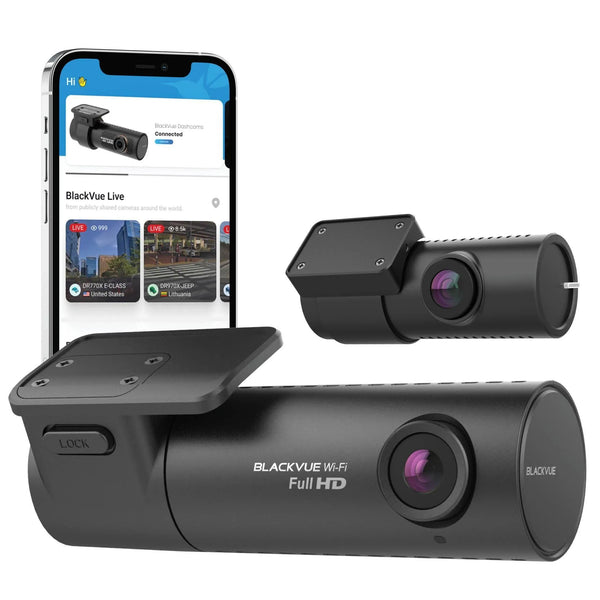
For example, say you have the BlackVue DR750S-2CH (now discontinued) and you want to upgrade to a 4K UHD dash cam, then we recommend the BlackVue DR900S-2CH (now discontinued). All the cables are interchangeable between the two models, so all you need to do is unplug the DR750S front and rear cameras, remove them from the windshield, and mount the DR900S front and rear cameras on the exact same spots (and of course, connect it with the existing wires and cables).
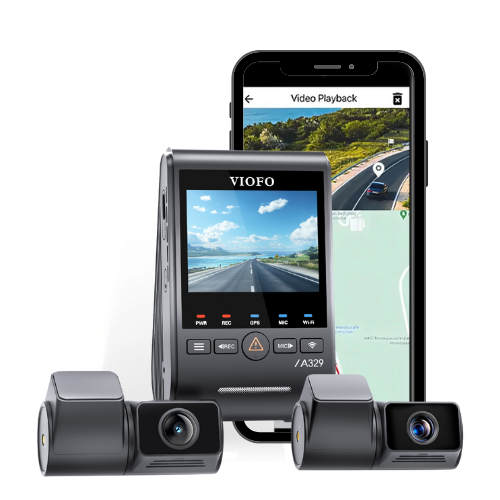
For instance, If you already have a VIOFO A129 installed in your vehicle and would like to upgrade to a 4K dash cam, you can get the VIOFO A129 Pro 4K 1-Channel model and just connect it to the A129’s IR camera. Rear cameras are the same for these two models, so you can even reuse the writing and mounts.
However, if you are looking to upgrade your existing Thinkware FA200 2-CH IRC, do be warned that the FA200 IRC is the only in-cabin IR dash cam from Thinkware. If you want to upgrade to a 4K UHD IR dash cam system, we recommend the BlackVue DR900S-2CH (now discontinued) IR system.
I need better parking mode recording for parking extended periods at the airport
If you are looking for best-in-class parking mode features, we strongly recommend the Thinkware U1000 (now discontinued) dash cam with the RADAR sensor.
I am starting a summer food truck business with my buddies and we need a system where we can all connect to a central viewer for easier management
What you need is a multi-channel, tamper-proof dash cam system and it needs to be a smart system and is remotely accessible, giving a comprehensive view of the vehicle and the road. Cloud integration offers scope for instant alerts and notifications and thus transforming any vehicle into a “connected vehicle” on and off the road.
Cloud dash cams are much more useful than simply downloading footage after an incident. Whether your main goal is to protect your drivers and vehicles, eliminate fraud attempts on your business, keep your drivers accountable, or reduce your insurance premiums, equipping your fleet vehicles with cloud-ready dash cams is a worthwhile investment.
Follow the tips above to get your dash cam ready for Spring and Summer. If you have any questions or if you want to speak to our dash cam experts, you can always find us online via email or Live Chat. You can also give us a call, too!
Dash cam maintenance schedule
Every month
Play back a recent front and rear recording, confirm the time stamp, and make sure the camera starts without warnings. A status light alone does not prove that usable footage is being saved. Check the power connection and camera angle after windshield service or a hard bump.
Every three months
Clean each lens with a soft lens cloth, clean the glass in front of the camera, and format the memory card through the camera or its official app. Review the card's age and replace it if you see card errors, missing clips, repeated restarts, or corrupted files. See our dash cam memory card guide for compatibility basics.
Before a road trip or seasonal weather change
Check the mounting adhesive, rear-camera cable, parking mode settings, and battery voltage protection. Download important clips before formatting. If you are planning a replacement, compare the best current dash cams and review the installation guide before assuming old wiring can stay in place.
Recommended products
These current products fit the needs covered in this guide.
How often should a dash cam microSD card be replaced?
There is no single calendar date for every setup. Continuous writing, heat, capacity, and recording load all affect card life. Replace a card when errors, gaps, freezing, or unexpected restarts appear, and use a high-endurance card approved for the exact camera.
Should I update dash cam firmware immediately?
Read the release notes and follow the manufacturer's instructions for your exact model. Keep stable power during the update and reset or recheck settings afterward because some releases change defaults.
Can an old dash cam use the wiring from a new model?
Sometimes, but never assume it. Connector shape, voltage, pinout, rear-camera cable, and parking mode wiring can change. If the compatibility information is unclear, contact us for help choosing an upgrade.