






Direkte Antwort: Wenn die Polizei nach Dashcam-Aufnahmen fragt, speichern Sie den Originalclip sofort, verhindern Sie, dass er überschrieben wird, erstellen Sie ein Backup und teilen Sie eine klare Kopie mit Zeit, Datum und Ort. Fahren Sie nicht tagelang weiter in der Annahme, dass die Datei noch vorhanden sein wird. Dashcams zeichnen von Natur aus in einer Schleife auf, was bedeutet, dass ältere Aufnahmen ersetzt werden können, sobald die Speicherkarte voll ist.
Das ist die praktische Lektion hinter einem kürzlichen Aufruf des Edmonton Police Service nach Dashcam- und Sicherheitsaufnahmen, über den in diesem Bericht des Edmonton Journal über den Polizeiaufruf nach einer Schießerei in Nord-Edmonton berichtet wurde. Die Polizei bat um Videoaufnahmen vom 24. April 2026, zwischen 21:45 Uhr und 23:45 Uhr, in der Nähe der 78 Street und 173 Avenue in Schonsee, insbesondere um Aufnahmen, die einen dunkelbraunen Pickup-Truck zeigen.
Dieser Leitfaden ist keine Rechtsberatung. Er ist ein praktischer Leitfaden zur Beweismittelsicherung für Fahrer, die der Polizei, der Versicherung oder ihrem eigenen Gedächtnis helfen wollen, ohne versehentlich Beweismittel zu verlieren.

Was tun, wenn die Polizei Dashcam-Aufnahmen anfordert?
Schützen Sie die Originaldatei, bevor die Loop-Aufnahme sie überschreibt. Wenn der Vorfall gerade passiert ist, halten Sie sicher an und drücken Sie die Notfall-Speichertaste Ihrer Dashcam, falls vorhanden. Viele Dashcams verfügen über eine Ereignissperrtaste, eine Notfallaufnahmetaste oder eine App-basierte Speicheroption, die die Datei in einen geschützten Ordner verschiebt.
Wenn Sie bereits zu Hause sind, entfernen Sie die microSD-Karte, bevor Sie weiterfahren. Bewahren Sie sie an einem sicheren Ort auf und erstellen Sie dann eine Kopie auf Ihrem Computer, Telefon oder externen Laufwerk. Lassen Sie die Originaldatei, wann immer möglich, unberührt. Wenn Sie einen Clip zur leichteren Anzeige kürzen müssen, tun Sie dies erst, nachdem Sie das vollständige Original gespeichert haben.
Den richtigen Kontext angeben
Wenn Sie Aufnahmen mit der Polizei teilen, fügen Sie den nützlichen Kontext hinzu: Datum, ungefähre Uhrzeit, Ort, Fahrtrichtung, Position Ihres Fahrzeugs, ob die Uhrzeit Ihrer Dashcam genau ist und ob GPS-Daten eingebettet sind.
Kurze Regel: Zuerst speichern, dann teilen
Fahren Sie nicht weiter mit derselben Speicherkarte, wenn der Clip wichtig ist. Speichern Sie die Originaldatei, erstellen Sie ein Backup und senden Sie dann eine klare Kopie über den von der Polizeibehörde angeforderten Kanal.

Wenn die Polizei den vollständigen Clip anfordert, senden Sie den vollständigen Clip. Bearbeiten Sie die Sekunden vor oder nach dem Vorfall nicht heraus, es sei denn, sie bitten ausdrücklich um eine kürzere Version. Der Vorlauf ist oft wichtig, einschließlich der Spurposition, der Ampeln, der Fahrzeugbewegung, des Wetters und des nahegelegenen Verkehrs.
Die Hauptregel ist einfach: Zuerst bewahren, dann teilen und ein Backup behalten.
Warum Dashcam-Aufnahmen bei polizeilichen Aufrufen wichtig sind
Ein nahegelegener Fahrer kann das fehlende Teil eines Ermittlungszeitplans erfassen. Überwachungskameras können zu weit entfernt, blockiert, im falschen Winkel ausgerichtet oder nicht verfügbar sein. Eine Dashcam, die durch das Gebiet fährt, kann die Straße genau dann aufzeichnen, wenn die Ermittler sie brauchen.
Im Fall von Edmonton baten die Ermittler um Videos, die einen dunkelbraunen Lkw zeigen könnten, der entlang der 173 Avenue oder südwärts auf der 78 Street von der 173 Avenue fährt. Ihre Aufnahmen müssen nicht immer den Hauptvorfall zeigen, um wichtig zu sein. Manchmal zeigt der nützliche Clip das verdächtige Fahrzeug davor oder danach, ein teilweises Kennzeichen, eine Fahrtrichtung oder einen Zeitstempel, der den Zeitplan untermauert.

Nützliche Aufnahmen sind nicht immer dramatisch
Nützliche Aufnahmen können ein Fahrzeug umfassen, das eine Kreuzung überquert, ein teilweises Kennzeichen, eine Marke oder ein Modell, eine Fahrtrichtung, Straßenverhältnisse, Beleuchtung, Wetter, GPS-Zeit oder andere Zeugenfahrzeuge, die die Ermittler später identifizieren möchten.
Deshalb sollten Sie einen Clip nicht löschen, nur weil er nicht dramatisch aussieht. Ermittler suchen möglicherweise nach Kontext, nicht nur nach dem Moment, in dem etwas passiert ist. Das Gedächtnis wird ungenau. Video, wenn es richtig erhalten bleibt, gibt der Polizei und der Versicherung etwas Konkreteres zum Arbeiten.
Welche Dashcam-Einrichtung macht Aufnahmen als Beweismittel nützlich?
Die beste Beweismittel-Einrichtung zeichnet klar auf, speichert zuverlässig und ermöglicht es Ihnen, Clips abzurufen, bevor sie überschrieben werden. Die Auflösung ist wichtig, aber nicht das Einzige. Die Qualität der Beweismittel ergibt sich aus der gesamten Einrichtung: Kameraklarheit, Speicher, GPS, Parkmodus, Stromversorgung und Zuverlässigkeit.

Video-Klarheit
Eine unscharfe Kamera mag beweisen, dass etwas passiert ist, aber eine scharfe Kamera ist weitaus nützlicher, um Fahrzeuge, Schilder, Fahrspuren und Bewegungen zu identifizieren. Für moderne Beweismittel suchen Sie nach 4K UHD- oder 2K QHD-Aufnahmen, guter Nachtleistung, HDR und, wenn möglich, Abdeckung vorne und hinten.
Speicher und Dateigesundheit
Speicher ist wichtiger, als die meisten Leute denken. Eine größere, langlebige microSD-Karte bietet Ihnen mehr Aufnahmezeit, bevor die Loop-Aufnahme ältere Dateien ersetzt. Wenn die Polizei Sie Stunden oder Tage nach einem Vorfall kontaktiert, kann die Speicherkapazität darüber entscheiden, ob der Clip noch vorhanden ist.
GPS und Zeitstempel
GPS kann helfen, Datum, Uhrzeit, Geschwindigkeit und Standort zu bestätigen. Wenn die Uhr Ihrer Dashcam falsch ist, sagen Sie es bei der Übermittlung der Aufnahmen. Ein falscher Zeitstempel macht den Clip nicht automatisch unbrauchbar, aber er benötigt Kontext.
Parkmodus
Der Parkmodus ist wichtig, wenn der Vorfall passiert, während Ihr Fahrzeug geparkt ist. Ein richtig eingerichteter Parkmodus kann Aufprälle, Bewegungen oder gepufferte Clips aufzeichnen, während das Fahrzeug ausgeschaltet ist. Dies ist besonders nützlich bei Parkplatz-Unfällen mit Fahrerflucht, Vandalismus, Diebstahlversuchen und Zwischenfällen über Nacht.

Für weitere Einrichtungshilfe nutzen Sie den Dash Cam Installations-Hub, den Hardwiring-Leitfaden oder den Add-a-Fuse Einrichtungsleitfaden.
Die besten BlackboxMyCar Dashcam-Optionen für beweismittelsensible Fahrer
Die richtige Dashcam hängt von der Art der Aufnahmen ab, die Sie sichern müssen. Für polizeiliche Anfragen nach Aufnahmen sind die stärksten Setups in der Regel eine Kombination aus klarem Frontvideo, bei Bedarf Heck- oder Kabinenabdeckung, zuverlässigem Speicher und Unterstützung für den Parkmodus.

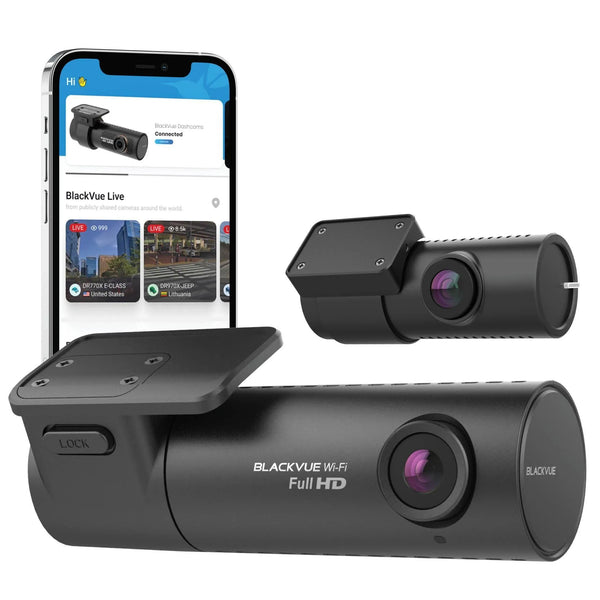
BlackVue Elite 10 2CH
Am besten für vernetzte Beweismittel. Die BlackVue Elite 10 2CH bietet Ihnen duale 4K UHD-Abdeckung, Sony STARVIS 2 Sensoren, BlackVue Cloud-Unterstützung, integriertes GPS und WLAN, HDR-Frontaufzeichnung und einen ultra-energiesparenden Parkmodus.
Dies ist die Premium-Wahl, wenn Sie Front- und Heckklarheit sowie vernetzte Funktionen wünschen, die den Clip-Zugriff erleichtern.

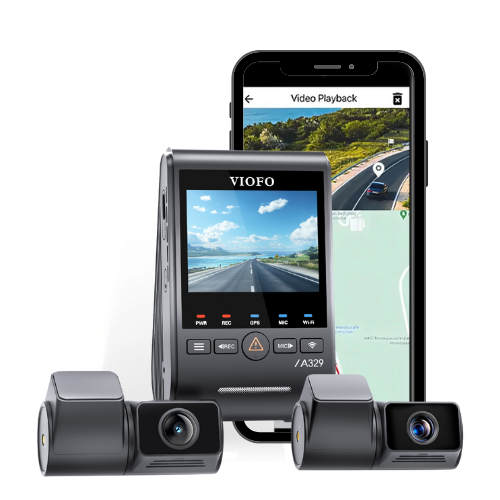
VIOFO A329S 3CH
Am besten für dreikanalige Abdeckung. Die VIOFO A329S zeichnet 4K UHD vorne, 2K QHD hinten und 2K QHD Innenraumaufnahmen mit drei Sony STARVIS 2 Sensoren, Wi-Fi 6, GPS, Sprachsteuerung, Parkmodus-Unterstützung und SSD-Speicher bis zu 4TB auf.
Dies ist eine gute Wahl für Mitfahrgelegenheiten, Familienfahrzeuge, Arbeitsfahrzeuge und Fahrer, die mehr als nur die Straße vor sich festhalten möchten.

Thinkware U3000 Pro 2CH
Am besten für Parkmodus-Schutz. Die Thinkware U3000 Pro 2CH kombiniert 4K UHD vorne und 2K QHD hinten Aufzeichnung, Sony STARVIS 2 Sensoren, HDR, duale Radar-Parküberwachung, integriertes GPS, 5GHz Wi-Fi, Bluetooth-Kopplung und ein mitgeliefertes OBD-II Kabel.
Dies ist die beweismittelsensible Referenz für Fahrer, denen der Parkschutz ebenso wichtig ist wie die Fahrtenaufnahmen.
Wenn Sie noch eine Einrichtung wählen, beginnen Sie mit dem Anwendungsfall. Für einen täglichen Pendler ist eine 2-Kanal-Dashcam normalerweise die beste Wahl. Für Mitfahrgelegenheiten oder geteilte Fahrzeuge ist eine 3-Kanal-Abdeckung sinnvoller. Für den Schutz vor Parkremplern kombinieren Sie den Parkmodus mit einer ordnungsgemäßen Installation und einem speziellen Akkupack wie dem BlackboxMyCar PowerCell 8.
Ihr nächster Schritt: Stellen Sie sicher, dass das Filmmaterial vorhanden ist, wenn Sie es brauchen
Wenn die Polizei Filmmaterial anfordert, handeln Sie schnell. Speichern Sie den Originalclip, sichern Sie ihn, notieren Sie Zeit und Ort und teilen Sie eine klare Kopie über den vom ermittelnden Beamten oder der Polizeibehörde angeforderten Kanal.
Das Filmmaterial hilft nur, wenn es noch existiert
Eine Premium-Dashcam-Einrichtung geht nicht nur um ein schöneres Video. Es geht um klares Filmmaterial, zuverlässigen Speicher, korrekte Zeitstempel, Parkmodus-Stromversorgung und schnelles Abrufen, wenn Polizei oder Versicherung einen Beweis benötigen.
Wenn Sie jetzt Ihre eigene Einrichtung überprüfen, suchen Sie nach der Schwachstelle: Können Sie Filmmaterial schnell finden, ist Ihre microSD-Karte intakt, ist die Uhr Ihrer Dashcam genau, erfasst sie nützliche Details bei Nacht und funktioniert der Parkmodus tatsächlich, wenn das Fahrzeug ausgeschaltet ist?
Wenn die Antwort nein ist, beheben Sie das vor dem nächsten Vorfall. Dashcam-Aufnahmen sind nur nützlich, wenn sie existieren, klar sind und rechtzeitig abgerufen werden können. Das ist der eigentliche Grund, eine Premium-Dashcam von BlackboxMyCar zu kaufen: bessere Beweismittel, wenn es darauf ankommt, nicht nur eine schönere Kamera an der Windschutzscheibe.
Dashcams bei BlackboxMyCar kaufen, die besten Dashcams von 2026 durchsuchen oder aktuelle Optionen von BlackVue, Thinkware und VIOFO vergleichen.
FAQ
Kann die Polizei meine Dashcam-Aufnahmen anfordern?
Ja. Die Polizei kann Fahrer und Anwohner bitten, Dashcam- oder Sicherheitsaufnahmen zu teilen, die eine Untersuchung unterstützen könnten. Wenn Sie unsicher sind, was Sie bereitstellen sollen, fragen Sie den ermittelnden Beamten, wie die Datei eingereicht werden soll und ob der vollständige Clip benötigt wird.
Sollte ich Dashcam-Aufnahmen bearbeiten, bevor ich sie an die Polizei sende?
Nein. Bewahren Sie die Originaldatei auf und vermeiden Sie das Kürzen der einzigen Kopie. Sie können auf Anfrage eine kürzere Kopie erstellen, aber bewahren Sie den vollständigen Clip vor und nach dem Vorfall auf, damit die Polizei den Kontext hat.
Wie verhindere ich, dass Dashcam-Aufnahmen überschrieben werden?
Sperren Sie die Ereignisdatei, wenn Ihre Dashcam dies zulässt, fahren Sie nicht weiter mit derselben Karte, wenn das Filmmaterial wichtig ist, entfernen Sie die microSD-Karte, wenn es sicher ist, und sichern Sie die Datei auf einem Telefon, Computer, Cloud-Laufwerk oder externen Laufwerk.
Welche Dashcam-Funktion hilft am meisten bei polizeilichen Anfragen nach Aufnahmen?
Klares Video ist die erste Priorität, aber die gesamte Einrichtung ist wichtig. Achten Sie auf 4K UHD oder starke 2K QHD-Aufnahmen, GPS, zuverlässigen Speicher, Parkmodus und eine saubere Installation, die die Kamera mit Strom versorgt und richtig ausgerichtet hält.
Lohnt sich der Parkmodus als Beweismittel?
Ja. Der Parkmodus kann Aufprälle, Bewegungen oder gepufferte Clips aufzeichnen, während das Fahrzeug ausgeschaltet ist, was für Fahrerflucht und Vandalismus entscheidend sein kann. Für Hilfe bei der Auswahl der richtigen Einrichtung kontaktieren Sie BlackboxMyCar.
Quellenangaben:
- Edmonton Police Service: Polizei sucht Video im Zusammenhang mit Schießerei in Nord-Edmonton
- Edmonton Journal: Edmonton Police fordern Dashcam-Aufnahmen zur Schießereiuntersuchung