
Zu Inhalt springen
Enhancing the New 2026 Toyota RAV4 XSE PHEV With a BlackVue DR750S-2CH and Cellink Neo Battery Pack

Enhancing the New 2026 Toyota RAV4 XSE PHEV With a BlackVue DR750S-2CH and Cellink Neo Battery Pack

The all-new 2026 Toyota RAV4 is finally hitting the streets, and we just had our first opportunity to work on the newest generation of the world’s best-selling SUV here at BlackboxMyCar. It came as a bit of a surprise, since our local customers have been bringing in countless examples of every new generation and facelift of the long-running smash-hit crossover, ever since we started offering installations. However, we had a feeling that wouldn’t necessarily be the case with the latest iteration, and there’s a huge reason why.

If you’ve been watching our short videos on YouTube or our social media channels, you may have seen a couple of videos that we recently released about the new RAV4’s Drive Recorder feature. While this isn’t exactly a new feature for Toyota, having first appeared on the Japanese-market Prius in 2022, the new RAV4 is the first model to make it available internationally. Like the Tesla Cam, the Drive Recorder effectively utilizes the vehicle’s built-in cameras as an integrated 2-channel front and rear or 4-channel 360° dash cam system, depending on the trim level and option packages. However, it does have some caveats, and more so than the Tesla Cam at that.

The Problem With the New RAV4’s Drive Recorder

While the Drive Recorder sounds good in theory, it leaves much to be desired compared to not just a dedicated dash cam, but also competing OEM systems like the Tesla Cam. First of all, its viewing angles are suboptimal, as the built-in cameras do double duty as parking aids during low-speed manoeuvring. Then, it only offers mediocre optics and 1080p video quality, which only allows it to do the bare minimum of capturing what happened, but not important details like license plate numbers in every situation. But that’s not all.

Much like the Tesla Cam, it’s extremely light on features, with no audio recording, limited built-in storage, no app access, and a somewhat complex process to retrieve footage via a USB drive. However, unlike the Tesla Cam, it also lacks parking mode, meaning it only functions while you drive. This means your new RAV4 with just the Drive Recorder alone is unprotected while it’s parked, unable to capture evidence of any hit-and-runs that might occur when you’re away from it.

The Solution: A Dedicated Dash Cam System

Thankfully, the owner of this particular 2026 RAV4 is one of our loyal customers who knows better than to trust the Drive Recorder blindly. Since we know that RAV4s are renowned for their reliability and strong resale value, we weren’t surprised at all when they told us it’s the fifth one they’ve owned, and that they’ve brought every one of them to us to ensure they’re fully protected, both while driving and parked.

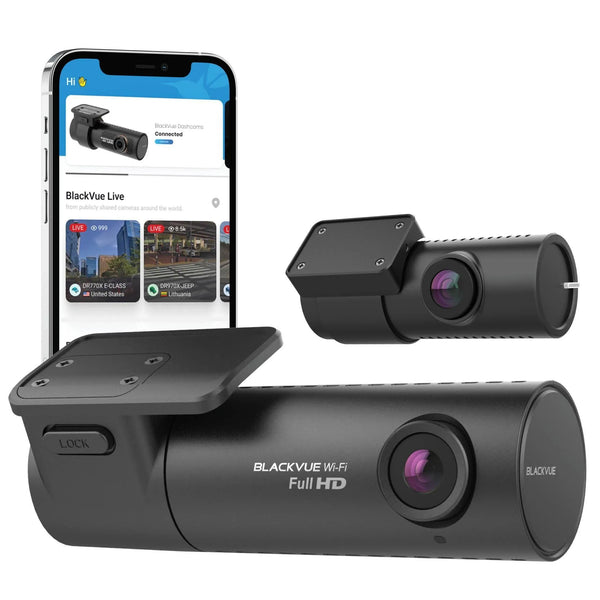
Unlike most of our installation showcases, which focus on new installations, the owner opted to have us reinstall their BlackVue DR750S-2CH and Cellink Neo battery pack, which have been serving them since they got their first RAV4. While it has several limitations compared to a more current setup, owing to its age, it still makes up for what the Drive Recorder lacks, especially as it’s already provided the owner with years of reliable service.

Step 1: Preparing the Vehicle

The first thing to do is to prepare the vehicle for the installation. This involves loosening or removing any trim panels and weather seals as needed to neatly route the cables, locating a power source and ground point for hardwiring the system, and determining how the rear camera will be installed since the RAV4 is an SUV with a rear liftgate. Since we’re also installing a battery pack, we need to find a suitable mounting location for it too. Fortunately, Toyota didn’t change too much on the new RAV4, so much of the process we used for the previous generation still applies here.

We started by using our trim tool to remove the plastic cover over the sensor housing behind the rearview mirror, which is held on by clips, followed by loosening the weather seals around the driver’s and left rear door openings by hand. Next, we carefully undid the clips with our trim tool to remove the A-pillar trim panel on the driver’s side so we could safely route the dash cam’s power cable and rear coaxial cable behind the side curtain airbag. This particular RAV4 also has the JBL premium audio system, which means there’s a speaker at the bottom of the A-pillar trim, so we had to take extra care to avoid pulling on its wires and potentially damaging them.

Finally, we unclipped and removed several other pieces: the side panel on the driver’s side of the dashboard, the driver’s side kick panel, and the driver’s side door sill trim, which will allow us to neatly route and hide the power cables later. We also located our power source for hardwiring the system, which in this RAV4 is the interior fuse box, found underneath the dashboard on the driver’s side, just above the brake pedal. Around back, we removed the trim panel at the top of the liftgate and loosened the largest of the two rubber grommets connecting from the vehicle’s body to the liftgate.

Step 2: Mounting the Cameras and Battery Pack

The next step is to mount the cameras and battery pack. In most vehicles, including this 2026 RAV4, the best place to mount a dash cam is behind the rearview mirror on the passenger side, because it places the dash cam outside the driver's view while keeping it relatively centred and within the coverage of the windshield wipers. Just remember that before mounting the camera, you should thoroughly clean the windshield surface to ensure the camera adheres properly and eliminate any marks or smears that may impact your footage's video quality.

To determine the best angle, we recommend you temporarily plug the camera into the 12V power outlet, which is located inside the centre console of the 2026 RAV4, and download and launch the BlackVue mobile app. You can check the camera’s live view to ensure the optimal position and viewing angle. Once this has been determined, carefully peel the backing off the 3M adhesive on the front camera mount, and press it into position against the windshield firmly for a few seconds.

For the rear camera, we determined that it can be mounted directly at the top of the rear window, just like the previous generation RAV4, so it is mounted using the same process as the front camera. You can plug it into the front camera temporarily and check the live view in the app for optimal angling and positioning, ensuring it’s within the rear wiper’s coverage and as centred as possible.

You will also want to ensure the rear camera stays clear of any defroster lines, which could weaken the adhesive and cause the camera to fall off if it’s mounted on top of them. Once you’ve found the perfect position and optimized the angle, simply repeat the process of peeling off the adhesive backing and firmly pressing it onto the glass for a few seconds to ensure a strong bond.

Lastly, before moving on to hardwiring and cable management, it’s time to mount the battery pack. You’ll generally want to ensure that it’s close to the power source, ensuring that its hardwiring kit is long enough to reach it, while keeping it and its cables out of the way. Fortunately, since the new RAV4 is actually based on an evolution of the previous generation’s TNGA-K platform, we were able to mount the battery pack underneath the rear edge of the driver’s seat, which means the seat can still be fully adjusted without affecting the battery or its cables.

Step 3: Hardwiring the Battery Pack

After mounting the units, it’s time to hardwire the battery pack. A battery pack is strongly recommended for hybrid vehicles like the new RAV4 due to their small 12V accessory batteries, which provide less parking mode runtime and a shorter overall lifespan compared to those found in fully gasoline or diesel-powered vehicles. It completely eliminates these issues by isolating the dash cam from the vehicle’s 12V battery and allows it to fully utilize its power without any detrimental effect. Start by plugging the hardwiring kit into the battery pack’s input connector, as you’ll want to run it from the battery pack to the fuse box and grounding point to ensure any remaining slack can be bundled up and safely hidden nearby.

The Cellink Neo uses a 2-wire hardwiring kit, with only an ACC power wire and a ground wire. After loosely routing the hardwiring kit towards the fuse box, we removed the fuse box cover, identified a suitable ACC fuse slot, and used an add-a-fuse to tap the ACC wire in for power. Be sure to verify that the chosen fuse slot is either empty or contains an existing fuse that meets the battery pack’s current (amp) requirements, and that the new fuse you’re adding is not rated for more current than the original fuse (if applicable).

We used a multimeter to verify that our chosen fuse slot was indeed an ACC connection, supplying power only when the vehicle is on, as well as confirming its polarity to ensure the add-a-fuse is inserted correctly. If you don’t have a multimeter, you can also use a basic circuit tester to do this—it will light up if there is power.

Interior view of a car showing the dashboard and driver's seat area.

After tapping the ACC wire into the fuse box, we moved on to grounding the hardwiring kit. In this 2026 RAV4, we located a bolt going into the metal dash structure, behind the side panel on the driver’s side of the dashboard, that we ended up using as the grounding point. Depending on the design of the grounding terminal on your battery pack’s hardwiring kit, you may only need to loosen the bolt enough to slide it in before retightening it, or you may need to remove the bolt entirely and bolt it back in through the hole in the terminal.

Once the battery pack is hardwired, it’s a good time to switch it on and verify that it charges properly. The best way to do this is by connecting to it with the Cellink Neo mobile app. Once the app and battery pack are connected, switch the vehicle on and verify that the status shows as charging, then switch the vehicle off to verify that the status shows as discharging.

Step 4: Wiring the Cameras

Next, we move on to wiring the cameras. The first step to this is wiring the front camera to the battery pack. Unlike newer BlackVue models, which use a 3-wire spliced connection to the battery pack, the DR750S-2CH uses a combination of its cigarette lighter adapter and a battery pack socket output.

Once the cigarette lighter adapter has been plugged into the socket output, it can be plugged into the power port on the front camera, routed up into the headliner above the sensor housing, across towards the driver’s side A-pillar and behind the side curtain airbag, and followed the pillar down to the floor. From here, we continued routing the combination towards the battery pack and plugged it into the output connector. Since this setup only utilizes the constant pin in the output connector, we took the opportunity to verify that the camera turns on when the battery pack is switched on.

Once that was done, we proceeded to wire the rear camera. We started by switching the battery pack off to cut power to the front camera, then plugged the rear coaxial cable into its port on the front camera. From there, we proceeded to follow the same routing as the cigarette lighter adapter until it reached the driver’s side A-pillar. Here, we ran the rear coaxial cable towards the rear of the RAV4 along the roofline, past the A and B-pillars, ensuring that it remained behind the side curtain airbag the whole time, until we reached the C-pillar. The gap exposed by loosening the weather seals around the door openings is helpful in allowing us to guide the cable towards the rear of the vehicle and ensure it doesn’t get in the way of any potential airbag deployments.

The new RAV4 has a large single trim panel covering both the C and D-pillars, which can be tricky to remove. However, since the side curtain airbag terminates before the C-pillar, we were able to simply tuck the remainder of the rear coaxial cable into the gap between this panel and the headliner and continue on to the rear edge of the headliner. Once we were there, we loosened the weather seal around the liftgate opening to route the cable across the rear edge towards the middle of the vehicle, where we could fish the cable out of the body, through the grommet we loosened earlier, and into the liftgate. We then, of course, plugged it into the rear camera.

5: Finishing Touches

Before we clean up the wiring and put the RAV4 back together, we must do one final check to ensure the system works without issues after installation. After switching the battery pack back on, we verified that the dash cam booted up, and we turned the vehicle on to ensure the battery pack was charging properly using the Cellink Neo mobile app. We then took the opportunity to connect to the dash cam with the BlackVue app, do one final check of the viewing angles using the live view, and optimize the settings. Once this was done, we turned the vehicle off to ensure the battery pack stopped charging. Lastly, since this is an older BlackVue that doesn’t use a 3-wire spliced connection, we waited five minutes to ensure it automatically entered parking mode.

After verifying that the system is functioning properly, we can finish by cleaning up any loose cables, bundling up and hiding any leftover slack, securing them with zip ties, and reinstalling any of the trim panels, weather seals, and grommets that we had to loosen or remove. While this was mostly quite straightforward, we did learn that the plastic cover over the front sensor housing was redesigned in a way that it could not go back on with the front camera in place. Fortunately, removing the front camera from its mount was all it took for us to have the clearance we needed, and we were able to reinstall it without any issues. Before we clipped it back into place, we fished the dash cam’s power and rear cables out of the opening for the rearview mirror stem to ensure they do not get pinched.

We’re Done!

And that's how you can enhance your new 2026 Toyota RAV4 with the added protection of a dedicated dash cam and battery pack! With this installed, you can now enjoy the additional peace of mind that comes with the optimal viewing angles and parking mode functionality that you just won’t get with the built-in Drive Recorder, all while drawing zero power from your 12V accessory battery while parked.

If you’re interested in installing a dash cam in your Toyota RAV4 or any other vehicle and you have any questions, please don’t hesitate to contact us; our team will gladly assist you! If you’re in the Vancouver, Canada area, you can also directly schedule an appointment with our in-house team of professional installers.

Nächster Artikel Family Safety Starts in the Driveway